

You are using an out of date browser. It may not display this or other websites correctly.
You should upgrade or use an alternative browser.
You should upgrade or use an alternative browser.
AlfaOBD
- Thread starter Ghost_RAM
- Start date
Disclaimer: Links on this page pointing to Amazon, eBay and other sites may include affiliate code. If you click them and make a purchase, we may earn a small commission.
Jimmy07
Senior Member
- Joined
- Feb 23, 2017
- Posts
- 3,512
- Reaction score
- 3,565
- Ram Year
- 2017
- Engine
- 6.4 Hemi
You would want to select “yes” if you want the DRLs to dropout.Okay... so I'm not a RAM owner, but I have a 2015 Hellcat Charger.
I'm trying to disable the DRL Droput, when I use the turn signal (I think this is a Canadian carryover to U.S. spec vehicles), so the DRL remains on, when the signals are used.
Running through the menu options, I get to:
CBC Features- DRL Dropout Enabled
Select value:
No
Yes
I'm guessing I would want to select No, to defeat DRL dropout? Any other Charger owners, on this thread with input?
I'll be working on this, this weekend.
New to the game, so proceeding with caution. I've already uploaded my OEM configuration to Google Drive, so I'm ready to get things done
Thanks for any feedback.
Bob

Edit: re-read that you don’t want them to dropout- select “no”.


- Joined
- Jul 10, 2017
- Posts
- 2,788
- Reaction score
- 2,331
- Location
- Hudson Valley, NY
- Ram Year
- 2014
- Engine
- 5.7L HEMI
I'm trying to disable the DRL Droput, when I use the turn signal (I think this is a Canadian carryover to U.S. spec vehicles), so the DRL remains on, when the signals are used.
Having the DRL turn off (drop) when the turn signal comes on is considered a safety feature so that the turn signal is not obscured by the DRL. Not saying it's good or bad, but that why it's done that way.
-K
diboblo
Senior Member
Nope.Having the DRL turn off (drop) when the turn signal comes on is considered a safety feature so that the turn signal is not obscured by the DRL. Not saying it's good or bad, but that why it's done that way.
-K
It's a Canadian law. Something like the signal has to be so far from the DRL. The headlight doesn't comply, so we, in the U.S., have to suffer the dropout, for Canadian compliance.
Theres a $300 box called a Tazer, that defeats the dropout, as long as it's plugged in to the OBD, but who wants that?
Bob
Sent from my SM-G955U using Tapatalk
CincyCuda68
Senior Member
That wou
That is the setting I used on my Ram and it worked. I do remember reading on the forum somewhere that if the vehicle is Canadian (in the Alfa settings) that no matter what you set in the drl settings wont do anything. I believe they had to change that to USA to “unlock” the drl settings. Do a search, but I think it is in this Alfa thread somewhere.Okay... so I'm not a RAM owner, but I have a 2015 Hellcat Charger.
I'm trying to disable the DRL Droput, when I use the turn signal (I think this is a Canadian carryover to U.S. spec vehicles), so the DRL remains on, when the signals are used.
Running through the menu options, I get to:
CBC Features- DRL Dropout Enabled
Select value:
No
Yes
I'm guessing I would want to select No, to defeat DRL dropout? Any other Charger owners, on this thread with input?
I'll be working on this, this weekend.
New to the game, so proceeding with caution. I've already uploaded my OEM configuration to Google Drive, so I'm ready to get things done
Thanks for any feedback.
Bob
crazykid1994
Senior Member
Tried installing camera. Getting camera system unavailable. What all should I check? What am I supposed to have set with Alfa
Edit: I’m good camera connector under steering wheel didn’t fully seat. Got it plugged together fully and backup camera is working
Edit: I’m good camera connector under steering wheel didn’t fully seat. Got it plugged together fully and backup camera is working
Last edited:
CincyCuda68
Senior Member
What camera? Cargo, Backup or Front?Tried installing camera. Getting camera system unavailable. What all should I check? What am I supposed to have set with Alfa
crazykid1994
Senior Member
Sorry reverse on the tailgateWhat camera? Cargo, Backup or Front?
diboblo
Senior Member
I recall reading something like that, too.That wou
That is the setting I used on my Ram and it worked. I do remember reading on the forum somewhere that if the vehicle is Canadian (in the Alfa settings) that no matter what you set in the drl settings wont do anything. I believe they had to change that to USA to “unlock” the drl settings. Do a search, but I think it is in this Alfa thread somewhere.
I've been combing this amazing thread, for days...
Thanks for the info.
Bob
Sent from my SM-G955U using Tapatalk
crazykid1994
Senior Member
I set Ecu config 3 rear camera present and I set vehconfig1 rear view camera
Edit: also set custsetmenu rear camera csm
Edit: also set custsetmenu rear camera csm
Last edited:

- Joined
- Mar 24, 2014
- Posts
- 2,919
- Reaction score
- 5,448
- Location
- South Jersey
- Ram Year
- 2010, 2014
- Engine
- 1500, 3500
Nope.
It's a Canadian law. Something like the signal has to be so far from the DRL. The headlight doesn't comply, so we, in the U.S., have to suffer the dropout, for Canadian compliance.
Theres a $300 box called a Tazer, that defeats the dropout, as long as it's plugged in to the OBD, but who wants that?
Bob
Sent from my SM-G955U using Tapatalk
It is also US federal law, Federal Motor Vehicle Safety Standard 108, probably because of Canadian law
CincyCuda68
Senior Member
When do you get that error? When in reverse or trying to set the camera options on the radio?I set Ecu config 3 rear camera present and I set vehconfig1 rear view camera
Edit: also set custsetmenu rear camera csm
The CSM setting should put it in the settings on your radio. I believe the only options there are the dynamic grid or fixed grid.
Did you use oem harness to install the cam or wire it yourself?
crazykid1994
Senior Member
It was reverse only. I figured it out. Triple checked the radio camera harness under the steering wheel and I guess it wasn’t properly seated. Everything is up and running but just something for everyone to think aboutWhen do you get that error? When in reverse or trying to set the camera options on the radio?
The CSM setting should put it in the settings on your radio. I believe the only options there are the dynamic grid or fixed grid.
Did you use oem harness to install the cam or wire it yourself?
CincyCuda68
Senior Member
Good deal!!!!It was reverse only. I figured it out. Triple checked the radio camera harness under the steering wheel and I guess it wasn’t properly seated. Everything is up and running but just something for everyone to think about
malsup83
Senior Member
Unfortunately didn't work for me. I'm also just getting started with it. I did base and premium.Body computer - Select your control unit (truck year) - Active diagnostics (car with hood up) - select procedure to start choose at the bottom "car configuration change" - Select option - scroll to VehConfig 3 Find the base and premium selections. They are close to VehConfig 4. These show up even if not connected to truck.
Onethatislazy
Junior Member
Can someone help me program my key fob's? Am I missing something? Do i need a specific headlight on or something else. Here is what I have tried.
Car: 2017 Ram 1500 Express
I have ordered 3 keys from amazon. Its not the "keyless start" kind but the ones you have to put into ignition. The FCC ID was identical in the listing on amazon (GQ4-53T) but once i got the key it showed a different FCC ID (2aokm-cyv2) so maybe that is why it failed. But i assume its just because they should still work for the one in the listing? My remote is the 3 button, unlock - lock - panic. One of the reviewers on the single pack said they got it to work before though i ordered double pack.
https://www.amazon.com/gp/product/B07982G11C (3 button pack)
https://www.amazon.com/gp/product/B0797Y577W (4 button single)
I followed the guide per this thread using alfa and mx obd. I got the pin from the "pin puller" android app since dealer said no. When i put the key to be programmed into the ignition, I left it as it was "off" - nor turning of the key. (Not ACC or ON or engine started). I tried programming using the "baseline system" keyfob (NOT 'highline system', or the default 'Program Ignition Fobik's'). After clicking start i get a message on all three that states:
Anything i need to try? Headlights on? Warning Hazard lights? I really want to get this to work.
Thanks for the help!
Car: 2017 Ram 1500 Express
I have ordered 3 keys from amazon. Its not the "keyless start" kind but the ones you have to put into ignition. The FCC ID was identical in the listing on amazon (GQ4-53T) but once i got the key it showed a different FCC ID (2aokm-cyv2) so maybe that is why it failed. But i assume its just because they should still work for the one in the listing? My remote is the 3 button, unlock - lock - panic. One of the reviewers on the single pack said they got it to work before though i ordered double pack.
https://www.amazon.com/gp/product/B07982G11C (3 button pack)
https://www.amazon.com/gp/product/B0797Y577W (4 button single)
I followed the guide per this thread using alfa and mx obd. I got the pin from the "pin puller" android app since dealer said no. When i put the key to be programmed into the ignition, I left it as it was "off" - nor turning of the key. (Not ACC or ON or engine started). I tried programming using the "baseline system" keyfob (NOT 'highline system', or the default 'Program Ignition Fobik's'). After clicking start i get a message on all three that states:
Failed. Conditions not correct or Request sequence error.
The fault afterwards reads as follows:
Faults Found / Error Code:
B1A24
Key Not Programmed
Last test completed unsuccessfully
Error Present
Failure Warning Lamp 'ON': Not Requested
B1A24
Key Not Programmed
Last test completed unsuccessfully
Error Present
Failure Warning Lamp 'ON': Not Requested
Anything i need to try? Headlights on? Warning Hazard lights? I really want to get this to work.
Thanks for the help!
SystemicChanges
Member
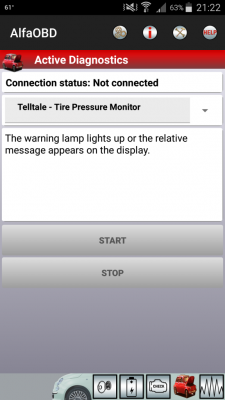
That is just to turn the indicator on in the panel to indicate is working properly.This is under instrument panel has anyone used this. Thought it might help disable tpmsView attachment 160687
Sent from my SM-N950U using Tapatalk
CincyCuda68
Senior Member
You only need it for certain things in Alfa such as TPMS, resetting RF Hub or programming Fobs. Most changes do not require the pin.I obtained my 4 digit key code. Do I have to enter it somewhere? I changed my tire size successfully without having to enter it anywhere.
Similar threads


- Replies
- 0
- Views
- 107


Staff online
-
 mikeruSuper Moderator
Members online
- poopsleeve
- RamDiver
- Jsdoggew
- goldramgb
- George4073
- Bigdave902
- olyelr
- PeteSzRam1500
- Paperboy4828
- Buddy
- Namelama
- Magfan2
- Pull Ya
- mikezman
- Curmudgeon
- northlane1
- Zoe Saldana
- 26 Tungsten
- jeff_rey
- duckman631
- MarshRam
- 7091ram
- seems fishy
- RamInfo
- TRK_GANG74
- davesue4b
- DILLIGAF
- djarrett
- Mlarv5
- Fedor Illarionov
- Rusty Nuts
- jws123
- tiger trap
- jmp187
- Craig52
- sammar
- AZRR
- Dean2
- PA Ram
- Bully Hayes
- hdog33
- mikeru
- OldBaldGuy
- Bigmax1209
- Wild one
- azmotley
- MAW201767540
- CamperMike
- Huliodude
- paul30415
Total: 25,135 (members: 80, guests: 25,055)
Robots: 1,873
Robots: 1,873