BJSwizzle
Senior Member
- Joined
- Aug 26, 2018
- Posts
- 279
- Reaction score
- 274
- Location
- Edmonton Alberta Canada
- Ram Year
- 2019 1500 Sport
- Engine
- 5.7L
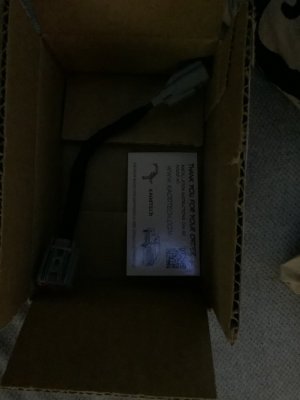
Connector arrived today, new media hub arrives Monday

Disclaimer: Links on this page pointing to Amazon, eBay and other sites may include affiliate code. If you click them and make a purchase, we may earn a small commission.
My bad, I was seeing EVIC and thinking radio, as I had the thread name in my brain. Tooooooooooo late at night to be trying to think. UghSo your saying that your UAS while using Android Auto/Car Play turn by turn shows up in EVIC where you normally see the speedometer?
The factory Nav radios will show left/right turns there.
what is this port for?
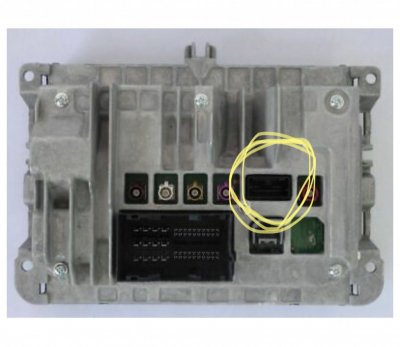
From what I’ve read, it’s for heated seat controls, which I do not have
It's not heated seat controls, I have heated seats and nothing is plugged into that port.From what I’ve read, it’s for heated seat controls, which I do not have
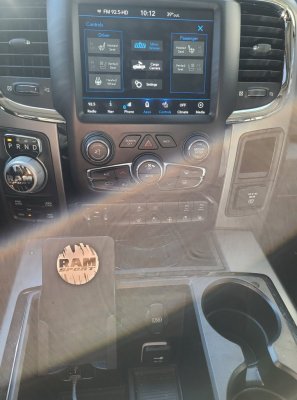
Are you seeing these 2 screen shots? And they are both grayed out correctView attachment 235495View attachment 235496
Which camera button do you have, cargo or backup? Go into AlfaOBD and make sure VehConfig 1 CHMSL Camera is set to yes, and Radio & Connectivity Trailer Hitch Camera is set to yes. The trailer hitch camera setting is what puts the backup camera button in the radio controls and apps. That one might not be set on your 2015, since I don’t believe the original radio supported both cameras back then.CoZo6, what software are you running? I am trying to get my two cams to show just the same as yours but all i can get to work on the UAQ is the single camera button in the middle of the controls screen, not the split and no app icons. I am on 22.6. 18 uaq in a 15. have both cams.
Which camera button do you have, cargo or backup? Go into AlfaOBD and make sure VehConfig 1 CHMSL Camera is set to yes, and Radio & Connectivity Trailer Hitch Camera is set to yes. The trailer hitch camera setting is what puts the backup camera button in the radio controls and apps. That one might not be set on your 2015, since I don’t believe the original radio supported both cameras back then.
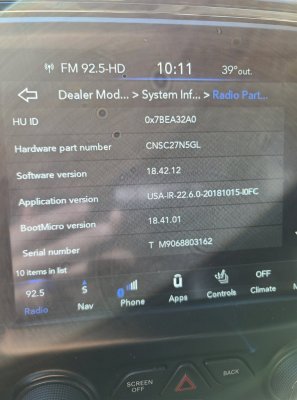
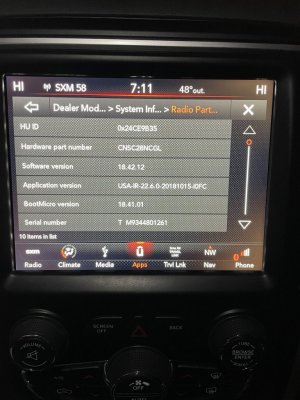
I’m at 22.6, but I don’t recall offhand to get into the screen to confirm. Once I find that process, I’ll take a few pictures too.CoZo6, what software are you running? I am trying to get my two cams to show just the same as yours but all i can get to work on the UAQ is the single camera button in the middle of the controls screen, not the split and no app icons. I am on 22.6. 18 uaq in a 15. have both cams.

 Moderator
 Supporting Member
 Marine Corps
It's not heated seat controls, I have heated seats and nothing is plugged into that port.
The controls in the radio for the seats, lights, brake controller, etc. happen over the CANbus via BCM. That why you hear som people saying their controls took a couple hours/key cycles for icons to show up, it was radio reading those control points.
If I had to take a guess, that port is most like for some advanced video/camera inputs and/or outputs.
I believe its for the advanced camera modules for newer vehicles. The module that connects cameras to give 360 degree views around the vehicle.
Moderator
Supporting Member
Marine Corps
Which camera button do you have, cargo or backup? Go into AlfaOBD and make sure VehConfig 1 CHMSL Camera is set to yes, and Radio & Connectivity Trailer Hitch Camera is set to yes. The trailer hitch camera setting is what puts the backup camera button in the radio controls and apps. That one might not be set on your 2015, since I don’t believe the original radio supported both cameras back then.
To pile on what Jimmy said, I needed these to settings in AlfaOBD to get the cargo camera button to work.Thanks Jimm07, i will double check on the trailer hitch one. I have tailgate cam and the chmsl cam (installed afterwards not stock, only the tg cam was stock) but i have gone from a 8.4 non nav to 8.4 nav that had the only sw that allowed having the cam button and app icon which worked flawlessly, since switched to a uaq touched nothing in alphaobd settings and yet all i get is the cam button in controls. i went in and turned off and back on all the chmsl settings but nothing has changed since (last time was months ago). Ill try again and get back, appreciate it.
I’m at 22.6, but I don’t recall offhand to get into the screen to confirm. Once I find that process, I’ll take a few pictures too.
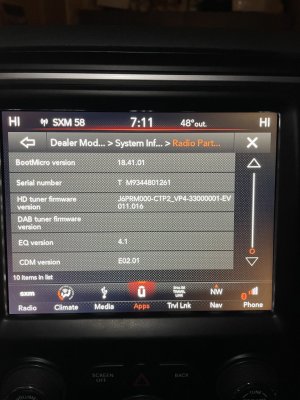
I installed the new HSM, 68217268AF. Still no heated seat control. Buttons still greyed out. I am thinking this has to be something with the head unit they are sending or software on it as I have replaced nearly every component trying to get this working. Frustrating to say the least.I’d be most interested when you get the other part the results. Did the other guy ever respond? It’s always good to have a 3rd set of eyes see all!
Sent from my iPad using Tapatalk
Thanks Jimm07, i will double check on the trailer hitch one. I have tailgate cam and the chmsl cam (installed afterwards not stock, only the tg cam was stock) but i have gone from a 8.4 non nav to 8.4 nav that had the only sw that allowed having the cam button and app icon which worked flawlessly, since switched to a uaq touched nothing in alphaobd settings and yet all i get is the cam button in controls. i went in and turned off and back on all the chmsl settings but nothing has changed since (last time was months ago). Ill try again and get back, appreciate it.
Don’t worry about the software version. I can pretty much guarantee you that the Radio & Connectivity Trailer Hitch Camera is not set to “Yes” on your 2015. Check that setting first.Thanks CoZo6, sob my sw is at 21.9 (usa-ir-21.9.0-20180516-109V) interesting as I went through the update process to 22.6, went through no issues and acted like it had updated yet didnt obviously... very odd. been pulling my hair out for months trying to figure this out. I rarely ever drive the truck so things stretch out. Now makes even more sense why the radio randomly resets itself i recall seeing a TSB in regards. I am going to go redo the update and circle back with results.
Thanks CoZo6, sob my sw is at 21.9 (usa-ir-21.9.0-20180516-109V) interesting as I went through the update process to 22.6, went through no issues and acted like it had updated yet didnt obviously... very odd. been pulling my hair out for months trying to figure this out. I rarely ever drive the truck so things stretch out. Now makes even more sense why the radio randomly resets itself i recall seeing a TSB in regards. I am going to go redo the update and circle back with results.