

You are using an out of date browser. It may not display this or other websites correctly.
You should upgrade or use an alternative browser.
You should upgrade or use an alternative browser.
How To: Install a 2018 4C (UAQ/UAS) Radio in 2013 - 2017 RAM
- Thread starter DeereGuy
- Start date
Disclaimer: Links on this page pointing to Amazon, eBay and other sites may include affiliate code. If you click them and make a purchase, we may earn a small commission.


likes2build
Senior Member
- Joined
- Jun 12, 2018
- Posts
- 1,234
- Reaction score
- 1,164
- Location
- Mohawk Valley, NY
- Ram Year
- 2018 Express RCSB
- Engine
- 3.6 Pentastar
@Mpgrimm2 at M2Mods can set you up with the harness and tell you whatever else you would need to do the conversion. As for the camera I have a UAQ conversion in my Express and in the daylight the camera image couldn't be better but in the dark of night here in the desert the image is a little grainy. I'm ordering LED backup bulbs to see if it's more of a lighting issue than a head unit characteristic at night.
I love my UAQ!!!!!
Update, So I received my Lasfit LED reverse bulbs and installed them. Big difference in the night time camera image, very happy with the image now.
- Joined
- Mar 30, 2014
- Posts
- 6,589
- Reaction score
- 5,204
- Location
- SC
- Ram Year
- 2022 Ram 1500 (5th Gen)
- Engine
- 5.7L
PS: a 2018 Canadian radio should likely work... The 13-17 RAx radios did just fine. I suspect a ram compatible application version is needed just like the USA radios. (The 17 UAx radios were a crap shoot)So is the issue that it’s a Canadian radio or that it’s out of a Compass or both? I picked it up cheap so I’m pretty sure that I can get my money back out of it. Not sure how to tell from VIN when a car is Canadian vs US.
Crazy thing is that I had the same rebooting issue with this radio too:
Between this and my cargo camera install I’m getting my ass kicked.
M² Mods.
likes2build
Senior Member
- Joined
- Jun 12, 2018
- Posts
- 1,234
- Reaction score
- 1,164
- Location
- Mohawk Valley, NY
- Ram Year
- 2018 Express RCSB
- Engine
- 3.6 Pentastar
So I activated the AT&T trial on my radio last night and moved some apps around and added the trailer brake. Today when I hooked up my phone for Spotify the Android auto icon and is gone, won't work and I just don't know where it went. I looked in apps but it's not there, what do I need to do to fix it and get it back?
Solved, rebooted the phone and there it was again.
Solved, rebooted the phone and there it was again.
Last edited:
rgardjr
Senior Member
- Joined
- Jan 19, 2014
- Posts
- 126
- Reaction score
- 47
- Ram Year
- 2014
- Engine
- Hemi 5.7L
So I’m guessing that I should also avoid buying a radio with the 21.9 software. Sounds like the sound quality was compromised by this update.
- Joined
- Mar 30, 2014
- Posts
- 6,589
- Reaction score
- 5,204
- Location
- SC
- Ram Year
- 2022 Ram 1500 (5th Gen)
- Engine
- 5.7L
I would if I could.So I’m guessing that I should also avoid buying a radio with the 21.9 software. Sounds like the sound quality was compromised by this update.
18.14 & 19.9 - Good
21.9 - bad audio
22.5 - mixed reviews (2 people)
M² Mods.
rgardjr
Senior Member
- Joined
- Jan 19, 2014
- Posts
- 126
- Reaction score
- 47
- Ram Year
- 2014
- Engine
- Hemi 5.7L
PS: a 2018 Canadian radio should likely work... The 13-17 RAx radios did just fine. I suspect a ram compatible application version is needed just like the USA radios. (The 17 UAx radios were a crap shoot)
M² Mods.
So I was able to put the radio in a Jeep and had the same results. This makes me think that the issue is with the radio itself and not necessarily because it doesn't like being installed in my Ram. I've read that no one has found the engineering mode that allows you to do a hard reset of the radio. I did see some mentions of dealers being able to do it using WiTech software. The service department at the dealer I bought my truck from wants nothing to do with trying it when I asked. Any other ideas? Any way to try this using AlfaOBD? I have messages in to a couple of radio repair places to see if its something that they can tackle. The place I bought the radio from gave me a full refund and told me to throw it away after I explained what was happening so I'm not concerned with bricking the radio.

g00fy
Senior Member
- Joined
- Aug 30, 2015
- Posts
- 258
- Reaction score
- 111
- Ram Year
- 2019
- Engine
- Cummins 6.7
So I was able to put the radio in a Jeep and had the same results. This makes me think that the issue is with the radio itself and not necessarily because it doesn't like being installed in my Ram. I've read that no one has found the engineering mode that allows you to do a hard reset of the radio. I did see some mentions of dealers being able to do it using WiTech software. The service department at the dealer I bought my truck from wants nothing to do with trying it when I asked. Any other ideas? Any way to try this using AlfaOBD? I have messages in to a couple of radio repair places to see if its something that they can tackle. The place I bought the radio from gave me a full refund and told me to throw it away after I explained what was happening so I'm not concerned with bricking the radio.
Maybe you already posted and i missed it, but, where'd you get the radio?
rgardjr
Senior Member
- Joined
- Jan 19, 2014
- Posts
- 126
- Reaction score
- 47
- Ram Year
- 2014
- Engine
- Hemi 5.7L
Maybe you already posted and i missed it, but, where'd you get the radio?
I bought it from a salvage yard. They have refunded my money and told me to throw the radio in the garbage since I couldn’t get it working.
- Joined
- Mar 30, 2014
- Posts
- 6,589
- Reaction score
- 5,204
- Location
- SC
- Ram Year
- 2022 Ram 1500 (5th Gen)
- Engine
- 5.7L
FYI, I've got a UAQ 18.14 USA SW linked in my 8.4 fw info thread. If you got your money back, give it a go since y your on application version 17.2.0 it will either work or won't. (Apparently can't trust the v18.7 sticker on the outside)I bought it from a salvage yard. They have refunded my money and told me to throw the radio in the garbage since I couldn’t get it working.
https://www.ramforum.com/index.php?posts/1125879
M² Mods.
Last edited:
ps2012st
Junior Member
- Joined
- Dec 19, 2012
- Posts
- 26
- Reaction score
- 12
- Location
- Cathedral City, CA
- Ram Year
- 2018 Express Regular Cab
- Engine
- 3.6 Pentastar
I did the upgrade with a 2018 UAS 8.4" non nav radio in my 2018 Express Regular Cab. Got the harness from Mike and the new single zone control unit, with the 2018 HVAC module from the same donor truck. After adding the 2018 upgraded USB hub, my Apple Carplay is now functional as well. Great upgrades all around and awesome support from this forum.
Everything works well except the temp not swinging all the way back to cold.
If I'm reading all the posts correctly ( and there are alot ) ..In order to fix this issue I need to
1. Purchase and install the temp and humidity sensors,
2. Purchase the Alpha OBD software and bluetooth OBD connector, also
3. Get the 2018 security interface cable in order to bypass the increased security on my 2018MY to work the Alpha software.
4. Then go through a set of procedures to set it to dual, then back to single.
Have I got that right?
Thanks for the info and everyone's help with the testing and diagnosis postings.
Everything works well except the temp not swinging all the way back to cold.
If I'm reading all the posts correctly ( and there are alot ) ..In order to fix this issue I need to
1. Purchase and install the temp and humidity sensors,
2. Purchase the Alpha OBD software and bluetooth OBD connector, also
3. Get the 2018 security interface cable in order to bypass the increased security on my 2018MY to work the Alpha software.
4. Then go through a set of procedures to set it to dual, then back to single.
Have I got that right?
Thanks for the info and everyone's help with the testing and diagnosis postings.
ckleinfeld
Member
- Joined
- May 28, 2016
- Posts
- 60
- Reaction score
- 32
- Location
- Springfield, Mo
- Ram Year
- 2015
- Engine
- Hemi 5.7
Along with the necessary harness to tie in the temp and humidity sensor, yes. So far, it's the only solution that has worked 100% of the time ( not a very large data set though).I did the upgrade with a 2018 UAS 8.4" non nav radio in my 2018 Express Regular Cab. Got the harness from Mike and the new single zone control unit, with the 2018 HVAC module from the same donor truck. After adding the 2018 upgraded USB hub, my Apple Carplay is now functional as well. Great upgrades all around and awesome support from this forum.
Everything works well except the temp not swinging all the way back to cold.
If I'm reading all the posts correctly ( and there are alot ) ..In order to fix this issue I need to
1. Purchase and install the temp and humidity sensors,
2. Purchase the Alpha OBD software and bluetooth OBD connector, also
3. Get the 2018 security interface cable in order to bypass the increased security on my 2018MY to work the Alpha software.
4. Then go through a set of procedures to set it to dual, then back to single.
Have I got that right?
Thanks for the info and everyone's help with the testing and diagnosis postings.
I would consider starting with just alpha and switching the HVAC configuration to something other than SZMTC, then back to SZMTC as a potential solution.
Sent from my SM-G965U using Tapatalk
ps2012st
Junior Member
- Joined
- Dec 19, 2012
- Posts
- 26
- Reaction score
- 12
- Location
- Cathedral City, CA
- Ram Year
- 2018 Express Regular Cab
- Engine
- 3.6 Pentastar
I have the upgraded harness from MpGrimm....I would just need to get the sensors I think. I purchased an auto dimming mirror and have it installed...does that harness need to be a particular part number to include the sensor for humidity?
Otherwise I am waiting on a bypass harness, but I think they are backlogged a bit on orders before I can do the alpha thing. So a bit tied for awhile.
Thanks for your help.
Otherwise I am waiting on a bypass harness, but I think they are backlogged a bit on orders before I can do the alpha thing. So a bit tied for awhile.
Thanks for your help.
Ryan Wehr
Junior Member
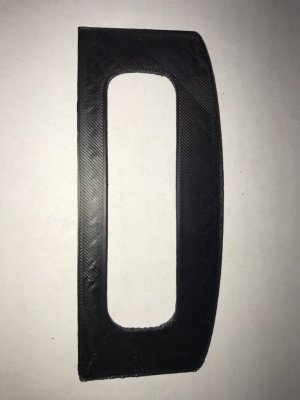
Looking for some help. I am trying to 3D print a face plate to cover the hole I cut for the media hub. The first picture is my first attempt at printing it and as you can see I don’t have the curve in the top and the middle opening is a bit to small. I started to dremel it out and the second pic is the finished product for the media hub slot. It is rough and doesn’t look that good.
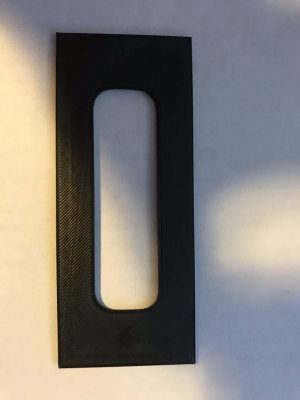
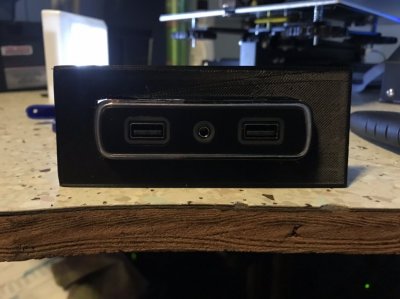
Now to the help part. I am new to 3D printing and rendering 3D objects so all I have is a tape measure and it makes it a little hard to get exact measurements. Can anyone take some good measurements and make a little drawing so i can render it into a 3D object? In millimeter would be awesome.
Thanks
Sent from my iPhone using Tapatalk
Now to the help part. I am new to 3D printing and rendering 3D objects so all I have is a tape measure and it makes it a little hard to get exact measurements. Can anyone take some good measurements and make a little drawing so i can render it into a 3D object? In millimeter would be awesome.
Thanks
Sent from my iPhone using Tapatalk

- Joined
- Jul 10, 2017
- Posts
- 2,788
- Reaction score
- 2,331
- Location
- Hudson Valley, NY
- Ram Year
- 2014
- Engine
- 5.7L HEMI
Looking for some help. I am trying to 3D print a face plate to cover the hole I cut for the media hub. The first picture is my first attempt at printing it and as you can see I don’t have the curve in the top and the middle opening is a bit to small. I started to dremel it out and the second pic is the finished product for the media hub slot. It is rough and doesn’t look that good.
View attachment 153906View attachment 153907
Now to the help part. I am new to 3D printing and rendering 3D objects so all I have is a tape measure and it makes it a little hard to get exact measurements. Can anyone take some good measurements and make a little drawing so i can render it into a 3D object? In millimeter would be awesome.
Thanks
I wish you luck with this. I don't have a UAx radio, but I've done other 3D printed parts for our trucks and I offered to do this one. I've had 3 different people volunteer to get me the measurements over the last several months (one even offered to mail me a hub to take my own), none have followed through on their offer.
I'd suggest getting yourself an inexpensive digital micrometer and taking your own measurements.
https://www.amazon.com/s/ref=nb_sb_noss_2?url=search-alias=aps&field-keywords=digital+micrometer
-K
Ryan Wehr
Junior Member
I wish you luck with this. I don't have a UAx radio, but I've done other 3D printed parts for our trucks and I offered to do this one. I've had 3 different people volunteer to get me the measurements over the last several months (one even offered to mail me a hub to take my own), none have followed through on their offer.
I'd suggest getting yourself an inexpensive digital micrometer and taking your own measurements.
https://www.amazon.com/s/ref=nb_sb_noss_2?url=search-alias=aps&field-keywords=digital+micrometer
-K
Thanks for the advice.
I printed out a 15cm ruler and a set of calipers. I reworked the outside dimensions and did a 2d print and it fits pretty good. I will work on the knock out for the actual media later today. Hopefully I can get some pictures up after the first 3d print is done.
rgardjr
Senior Member
- Joined
- Jan 19, 2014
- Posts
- 126
- Reaction score
- 47
- Ram Year
- 2014
- Engine
- Hemi 5.7L
FYI, I've got a UAQ 18.14 USA SW linked in my 8.4 fw info thread. If you got your money back, give it a go since y your on application version 17.2.0 it will either work or won't. (Apparently can't trust the v18.7 sticker on the outside)
https://www.ramforum.com/index.php?posts/1125879
M² Mods.
So I'm messing around with this right now. I looked at the radio module in AlphaOBD and it brings up an error message when I connect to the radio. I tried to update the firmware, but no luck so far. The USB hub will read from a thumb drive one time, but it doesn't continue to work when the radio reboots. I noticed this when I was checking to see if the radio would play mp3s off of the thumb drive. It worked the very first time, but after it reboots it doesn't see the drive any longer. I'm installing the update on a different thumb drive to see if that will make a difference. I'm just about out of things to try on my end. Sent an email and left voice mails at NavRepair.com to see if they thought they might be able to do something, but haven't heard back and don't expect to since it's been 4 days. Here are the logs from my original radio and the UAQ radio. Weird how the VIN is populated in the UAQ but not in my orginal:
Original RA4 Radio
Tested device: Radio Navigator Module
2019/01/30 12:24:04.544
DEVICE INFO:
Fiat drawing number:
VIN:
Hardware number:
Hardware version: FF
Software number: 17.11.17.00
Software version: 8971
Homologation number:
ISO code: 2020202020
VIN:
ECU serial number: T00BE030XXXXXX
ECU Part Number: 68224525AG
Hardware number: 0002604450
Hardware Supplier Identification: Harman / Becker
Software Logical Block Supplier Identification: Harman / Becker
New UAQ Radio
2019/02/01 14:38:31.235
DEVICE INFO:
Fiat drawing number:
VIN: 1C6RR7PT8ES2XXXXX
Hardware number: �����������
Hardware version: 11
Software number: 110800
Software version: 1108
Homologation number:
ISO code: FFFFFFFFFF
VIN: 1C6RR7PT8ES2XXXXX
ECU serial number: T M9086XXXXX
ECU Part Number: 68332802AA
Hardware number: CNSCN7N1GL
Hardware Supplier Identification: Panasonic
Software Logical Block Supplier Identification: Panasonic
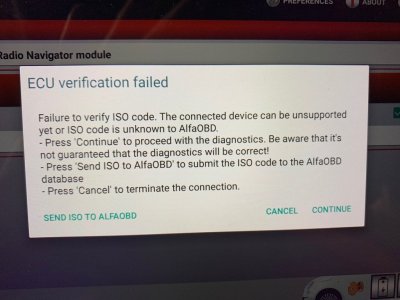
Ryan Wehr
Junior Member
Thanks for the advice.
I printed out a 15cm ruler and a set of calipers. I reworked the outside dimensions and did a 2d print and it fits pretty good. I will work on the knock out for the actual media later today. Hopefully I can get some pictures up after the first 3d print is done.
This is revision 4 of the media hub face plate.
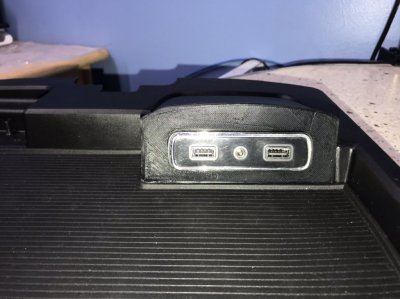
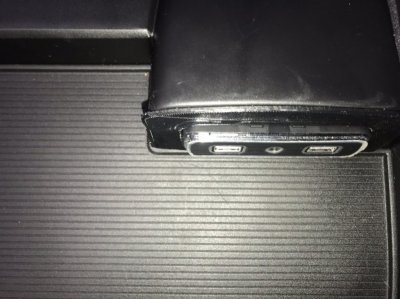
I spent about 5 minutes with the dremel on the hole where the media hub goes and it popped right in. I still need to clean the top edge as I could not get the angle to match as well as I would have liked. Then I just need to smooth out the piece and it should be good.
Sent from my iPhone using Tapatalk
Last edited:
likes2build
Senior Member
- Joined
- Jun 12, 2018
- Posts
- 1,234
- Reaction score
- 1,164
- Location
- Mohawk Valley, NY
- Ram Year
- 2018 Express RCSB
- Engine
- 3.6 Pentastar
So here is my question for the day. I installed a UAQ in my 2018 that came with a nothing radio. I never changed the media hub as the OEM one worked fine with Android Auto. Today I tried to use a flash drive with music and nothing happened, as in it doesn't recognize that it's there. Not a big deal just wondered if anyone has any thoughts on this? I attached a picture of the factory hub and I know that it works with a small radio with a flash drive and that the drive is good and has files.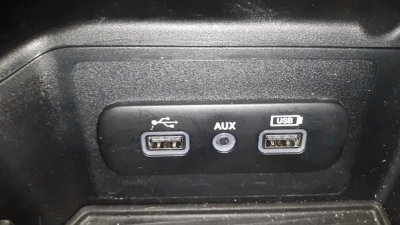

SitKneelBend
Moderator
Staff member
Member Relations Specialist
 Moderator
 Supporting Member
 Marine Corps
- Joined
- Jan 8, 2015
- Posts
- 11,004
- Reaction score
- 7,719
- Location
- St. Louis
- Ram Year
- 2014
- Engine
- 3.6 Pentastar
So, I had a similar issue on an older RA3. I bypassed the hub altogether by plugging the USB directly into the radio with this adapter:So I'm messing around with this right now. I looked at the radio module in AlphaOBD and it brings up an error message when I connect to the radio. I tried to update the firmware, but no luck so far. The USB hub will read from a thumb drive one time, but it doesn't continue to work when the radio reboots. I noticed this when I was checking to see if the radio would play mp3s off of the thumb drive. It worked the very first time, but after it reboots it doesn't see the drive any longer. I'm installing the update on a different thumb drive to see if that will make a difference. I'm just about out of things to try on my end. Sent an email and left voice mails at NavRepair.com to see if they thought they might be able to do something, but haven't heard back and don't expect to since it's been 4 days. Here are the logs from my original radio and the UAQ radio. Weird how the VIN is populated in the UAQ but not in my orginal:
Original RA4 Radio
Tested device: Radio Navigator Module
2019/01/30 12:24:04.544
DEVICE INFO:
Fiat drawing number:
VIN:
Hardware number:
Hardware version: FF
Software number: 17.11.17.00
Software version: 8971
Homologation number:
ISO code: 2020202020
VIN:
ECU serial number: T00BE030XXXXXX
ECU Part Number: 68224525AG
Hardware number: 0002604450
Hardware Supplier Identification: Harman / Becker
Software Logical Block Supplier Identification: Harman / Becker
New UAQ Radio
2019/02/01 14:38:31.235
DEVICE INFO:
Fiat drawing number:
VIN: 1C6RR7PT8ES2XXXXX
Hardware number: �����������
Hardware version: 11
Software number: 110800
Software version: 1108
Homologation number:
ISO code: FFFFFFFFFF
VIN: 1C6RR7PT8ES2XXXXX
ECU serial number: T M9086XXXXX
ECU Part Number: 68332802AA
Hardware number: CNSCN7N1GL
Hardware Supplier Identification: Panasonic
Software Logical Block Supplier Identification: Panasonic
View attachment 154002
USB Host Cable mini B male to USB... https://www.amazon.com/dp/B00JK1OFOM?ref=ppx_pop_mob_ap_share
It updated immediately and the hub worked normally afterwards. I suspect it was a driver issue. Your's sounds a little different, but a similar solution may work...
Sent from my HTC U11 using Tapatalk
Last edited:
Similar threads

- Replies
- 1
- Views
- 216


Staff online
-
 ShaggyAdministrator/Owner
Members online
- JW2 Innovations
- ginokaan
- SPORTRAM17
- nkeen07
- rammer54
- azmotley
- Eatstone
- commander
- 609dry
- SteddyRam
- cornpop
- ron2hoff
- shctbbe
- Lance1985
- Hondaaholic
- Ernest Smith
- Shaggy
- DILLIGAF
- FremontSteve
- CFD-123
- Islander39er
- RAM35
- Jimhow4545
- Red Rex
- Jake1031996
- RamCares
- Coleocole
- Buddy
- Brrielly
- Curmudgeon
- adrianp89
- Dean2
- Cruze418
- olyelr
- HM_SanDiego
- djarrett
- Schotzy
- Vicman
Total: 1,880 (members: 42, guests: 1,838)
Robots: 864
Robots: 864