Wolfpup
Member
someone replaced their rear camera and it fixed something, not sure what


Disclaimer: Links on this page pointing to Amazon, eBay and other sites may include affiliate code. If you click them and make a purchase, we may earn a small commission.

 Moderator
 Supporting Member
 Marine Corps
How long has it been installed without pulling fuses and/or removing power? It takes roughly two hours for SXM to show up and the correct HVAC options to be in place.Holy long thread......... I've been poking around, searching around and still have a few questions.
I have a 2014 Ram 3500. Came with the 8.4" system, Nav, Sirius radio.
I picked up a used unit out of a 2018 Ram 1500. 8.4" with nav.
I installed it and it does work BUT here's my 4 questions.
1. Has anyone gotten the heated seat, cooled seat and steering wheel touch controls working?
2. When I hooked it all up I had power coming out of the media usb port fine and when I connected my phone I was able to screen mirror android auto just fine. Once I got to work and I presume the truck had time to go to sleep when I left for work no power to the usb cord anymore *my phone doesn't charge* and no more screen mirroring. WTF? I do have the Jeep Compass + module + harness from M2 mods on order but why did this work then quit?
3. I bought this with "navigation stuck at one spot" and sure enough, navigation seems stuck at some random place across the country. When I go to look at the GPS signal / satellites I get nothing. All are blank with no signal. Has anyone run into this and is there a known fix?
4. Sirius. Under Sirius status it shows it's subscribed but I do not have the Sirius button on the radio? On my 2014 unit from the radio I could select AM/FM/ Satellite. This one is just AM/FM with no Sirius option. Am I missing something here?
I do have Alfaobd and have poked around but didn't find anything I thought might be useful.
Thanks for any help.
If I should just start a new thread just say so and I'll delete this and start a fresh one.
Thanks again! Great info here.
How long has it been installed without pulling fuses and/or removing power? It takes roughly two hours for SXM to show up and the correct HVAC options to be in place.
If there is not a loose connection inside the unit, I'd say it may be failing bit by bit. Do you know what kind of salvage it came from?
Sent from my HTC U11 using Tapatalk
Moderator
Supporting Member
Marine Corps
PM the VIN to me.Oddly enough the USB port has power again......
My truck sat while I worked for 8 hours. On my way to work had usb power / screen mirroring / android auto. After sitting 8 hrs had nothing for my drive home. Got home, 1hr later it's back again.
Still no SXM.
HVAC works fine. Just heated seats / vent seats / heated wheel greyed out however when I turn them on and off via the buttons you can see them showing powered up on the head unit.
I have no idea what it came from other than 2018 Ram 1500. I do have the vin / pin.
Holy long thread......... I've been poking around, searching around and still have a few questions.
I have a 2014 Ram 3500. Came with the 8.4" system, Nav, Sirius radio.
I picked up a used unit out of a 2018 Ram 1500. 8.4" with nav.
I installed it and it does work BUT here's my 4 questions.
1. Has anyone gotten the heated seat, cooled seat and steering wheel touch controls working?
2. When I hooked it all up I had power coming out of the media usb port fine and when I connected my phone I was able to screen mirror android auto just fine. Once I got to work and I presume the truck had time to go to sleep when I left for work no power to the usb cord anymore *my phone doesn't charge* and no more screen mirroring. WTF? I do have the Jeep Compass + module + harness from M2 mods on order but why did this work then quit?
3. I bought this with "navigation stuck at one spot" and sure enough, navigation seems stuck at some random place across the country. When I go to look at the GPS signal / satellites I get nothing. All are blank with no signal. Has anyone run into this and is there a known fix?
4. Sirius. Under Sirius status it shows it's subscribed but I do not have the Sirius button on the radio? On my 2014 unit from the radio I could select AM/FM/ Satellite. This one is just AM/FM with no Sirius option. Am I missing something here?
I do have Alfaobd and have poked around but didn't find anything I thought might be useful.
Thanks for any help.
If I should just start a new thread just say so and I'll delete this and start a fresh one.
Thanks again! Great info here.
1. ok, so the heated seats and cooled seats, etc. soft buttons wont show up unless there is a module connected between the radio and the bcm that forces the signal to pass through between the radio and the bcm. we have the wrong model year for it to show.
2. that's a first for me. i dont know why that worked like that. it didn't for me at all and I had to upgrade the usb hub and get a 6pin-8pin adapter to enable the hub to work, as just about everyone else with a 2017 and lower year truck.
3. my older RA4 had that problem before the software update. check the software revision number and make sure it's 22.5 or above (I believe thats the revision that corrected the satelites not receiving the GPS correctly)
4. it sometimes takes a few hours to update and show the xm button. thats how you'll know it "learned" your truck.
there is an AlfaOBD setting to change to let it know what USB hub you have. It's listed in this thread somewhere on the earlier pages.
hope this all helped.
PM the VIN to me.
Sent from my HTC U11 using Tapatalk
Moderator
Supporting Member
Marine Corps
It's quite possible a bad piece of hardware is causing it. I had the same thing happen and I needed a different and/or larger USB flash drive. I switched to a 32GB and it worked.1. Ok if I have to buy a module just to get the soft buttons working I will pass. I never use them but was just trying to get everything working if it were possible via coding.
2. Yeah bizarre. The thing is "screen mirroring" works fine however "android auto" is grayed out. As far as I can tell android auto works fine via screen mirroring. It looks exactly as it did in my old 2018 Cruze with AA running. After my drive home from work with zero power to the USB port it just started working again.
3. Software Rev: 17.34.40 Application Version USA-ER-18.13.0-20170826-E06V. Yesterday I tried to update to 22.6 a few times. It will always get to 72% then fail. I have tried it twice. After it fails it reverts back to the old firmware. I am currently trying again. I put a battery charger on the truck and am just going to let it fail and retry a few times. I sort of wonder if it's failing because of my GPS/SXM issue.........
4. I hope it learns the XM! It's got an active subscription and when it expires I will play their game to get 6mos for 60 bucks as needed. *I find it much easier to just use a debit card from an account I never use then after signing up and getting charged cancel that debit card so it wont' auto renew. Let it lapse then a couple weeks later get another $60 dollar offer. Rinse repeat.
I will post an update as things progress.
Thank you so much for your input.
Moderator
Supporting Member
Marine Corps
It remembers between drives! Just tested.it hopefully remembers between drives. I'll attempt the upgrade tonight, i think.
I've tried two different 16GB drives.It's quite possible a bad piece of hardware is causing it. I had the same thing happen and I needed a different and/or larger USB flash drive. I switched to a 32GB and it worked.
Sent from my HTC U11 using Tapatalk
Moderator
Supporting Member
Marine Corps
Make sure it can still be formatted fat32. I think the 64GB drives default to exFAT?I've tried two different 16GB drives.
EDIT: I found a 64GB. Going to give it a whirl.

FYI... Post 10 of the dyi camera kit thread...Also, I don't know if this has been covered here but on a different topic.......
My 2014 radio. 8.4" unit. When I got the truck if I hit cargo cam there was two cameras available however on the radio when you'd select the tailgate "rear" camera it would show the cargo cam on the screen. When you picked the cargo cam it would show "unavailable".
When you put the truck in reverse the mirror would show the correct camera and the radio would pop up and show the rearview camera but on the screen would actually show the cargo cam.
From what I researched the radio had an update at some time. Apparently the original configuration for the 2014 radio would only show the cargo cam with no backup cam option. It got an update at some time that enabled the ability to display both cameras however the wiring to the radio only had the cargo cam. No wiring for the rearview cam.
What I did was looked at a schematic for a 2016 radio. Sure enough the 16' showed two camera inputs and the 14' only showed one.
What I did was re-pinned the existing cargo cam wires (3) to the other vacant location where the 16' shows the other camera. I then tapped into the 3 wires that go from the tailgate cam to the rearview mirror (3 wires on passenger end of dash) and ran them to the radio and plugged them into the 3 pins that I had just vacated.
After I did that I could now display either camera on my radio and when put in reverse the backup cam would show in the mirror and radio.
If this has been covered I apologize, long long thread here.
If someone wants pin numbers I can provide them. Just reply.
What is the part number on this radio?1. Ok if I have to buy a module just to get the soft buttons working I will pass. I never use them but was just trying to get everything working if it were possible via coding.
2. Yeah bizarre. The thing is "screen mirroring" works fine however "android auto" is grayed out. As far as I can tell android auto works fine via screen mirroring. It looks exactly as it did in my old 2018 Cruze with AA running. After my drive home from work with zero power to the USB port it just started working again.
3. Software Rev: 17.34.40 Application Version USA-ER-18.13.0-20170826-E06V. Yesterday I tried to update to 22.6 a few times. It will always get to 72% then fail. I have tried it twice. After it fails it reverts back to the old firmware. I am currently trying again. I put a battery charger on the truck and am just going to let it fail and retry a few times. I sort of wonder if it's failing because of my GPS/SXM issue.........
4. I hope it learns the XM! It's got an active subscription and when it expires I will play their game to get 6mos for 60 bucks as needed. *I find it much easier to just use a debit card from an account I never use then after signing up and getting charged cancel that debit card so it wont' auto renew. Let it lapse then a couple weeks later get another $60 dollar offer. Rinse repeat.
I will post an update as things progress.
Thank you so much for your input.
Moderator
Supporting Member
Marine Corps
What year is your Ram?I successfully upgraded my 2019 UAS from a 2019 classic Ram 1500 from 22.5 to 22.6 using the files on Mpgirmm2’s post regarding upgrading the sw/fw. The UAS build date I have is March 2019 on the label on the side of the radio. everything seems to work fine. Good sound, backup camera seems to adjust brightness correctly at night.
68331631AEWhat is the part number on this radio?
Moderator
Supporting Member
Marine Corps
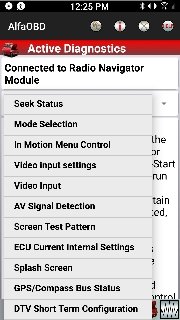
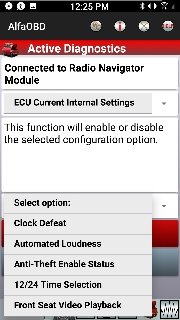
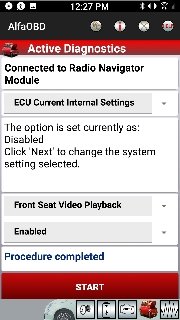
Which radio are you working with?So now that I have everything working I thought it's time to (possibly) break stuff. There are some settings I want to see if they do anything.
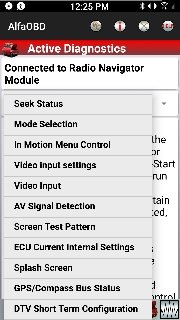
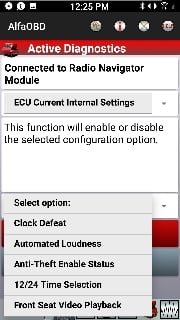
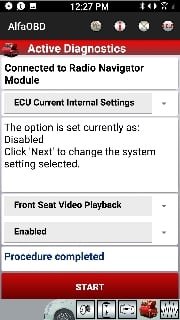
There is a settings menu in the radio navigator module you will not see until you connect to the radio called "ECU Current Internal Settings".
So far, "Clock Defeat" does remove the time from the radio.
I've enabled "Front Seat Video Playback" to see if this will keep the cargo camera on in motion.
Sent from my HTC U11 using Tapatalk