

How To: Install a 2018 4C (UAQ/UAS) Radio in 2013 - 2017 RAM

Disclaimer: Links on this page pointing to Amazon, eBay and other sites may include affiliate code. If you click them and make a purchase, we may earn a small commission.

SitKneelBend

Moderator
Staff member
Member Relations Specialist
Moderator Supporting Member Marine Corps
Joined
Jan 8, 2015
Posts
11,004
Reaction score
7,717
Location
St. Louis
Ram Year
2014
Engine
3.6 Pentastar
Search car-part.com several times a day. When you find one at a good price, do not hesitate, buy it. Infotainment does the same thing. They buy used radios from the wrecking yards, wipe them down and sell them as "refurbished". Unfortunately they have driven up the price of the used radios but some yards still sell them at a good price. You have to be QUICK.

Once you have a radio, PM Mike (MPGrimm2) and he will get in touch with you to customize a kit for a trouble-free install. DON'T buy harnesses, kits, etc from Infotainment. They don't customize them for your truck and many of their customers come to this forum for help because they can't get timely support from them. Even though they are not his customers, Mike tries to help get their radio working and makes nothing for his effort. BUY from Mike, you will be a happy camper and support a forum vendor who takes care of his customers.
This...

Sent from my HTC U11 using Tapatalk

 

Errol Smith

Member
Joined
Aug 19, 2020
Posts
36
Reaction score
65
Location
Sparks, NV
Ram Year
2013
Engine
Cummins 6.7
Hello!

I just did this mod today with cables from mpgrimm that worked perfectly! I have one outstanding problem right now, though. When I test fit the radio, my backup camera only worked with the soft key on the radio. The dynamic lines kicked on when I went into reverse and disappeared when I popped out of reverse but the radio wouldn't switch automatically to the backup camera when I went into reverse.

Now, after the install (after reconnecting the negative battery terminals) the soft key doesn't work anymore. It's there, it just doesn't do anything. I verified in AlfaOBD that the camera is enabled under both commands.

Hoping someone can help me out with this one. The truck is the 6-speed manual (G56) and the backup camera worked just fine on the old 5" touchscreen radio.

Thanks
 

Mpgrimm2

Senior Member
Supporting Vendor Navy Badge
Joined
Mar 30, 2014
Posts
6,588
Reaction score
5,202
Location
SC
Ram Year
2022 Ram 1500 (5th Gen)
Engine
5.7L
Hello!

I just did this mod today with cables from mpgrimm that worked perfectly! I have one outstanding problem right now, though. When I test fit the radio, my backup camera only worked with the soft key on the radio. The dynamic lines kicked on when I went into reverse and disappeared when I popped out of reverse but the radio wouldn't switch automatically to the backup camera when I went into reverse.

Now, after the install (after reconnecting the negative battery terminals) the soft key doesn't work anymore. It's there, it just doesn't do anything. I verified in AlfaOBD that the camera is enabled under both commands.

Hoping someone can help me out with this one. The truck is the 6-speed manual (G56) and the backup camera worked just fine on the old 5" touchscreen radio.

Thanks
@ManualCummins - was it you that also posted about this G56 specific issue with the UAQ/UAS upgrades?
 

DarbyOhara

Member
Joined
Apr 3, 2014
Posts
54
Reaction score
15
Location
Middle Georgia
Ram Year
2021 Ram 2500 Big Horn Crew 4x4
Engine
6.4L V8
I need help of what I need to go from the 5" to the 8.4". I have a 2019 RAM 1500 Classic Warlock (4th generation). I tried to message Mike (MPGrimm2) and the system said he doesn't exist. Is this looking good?

8.4" Radio 4C w/o Nav 68331635AH (UAS)

But I get a bit confused after that of what part numbers since they are all over the map... I have the non-dual climate zone so I think I need these:

Bezel: 68340283AC
Instrument Panel w/ Vents: 5YU433XLAF

Climate Control Unit: 68366552AA

Climate Control Cable: no part # but found here: https://www.4thgenramelectronics.com/product-page/8-4-radio-conversion-harness

I believe this is all I need? I'll try to post a picture of my current media center to give you an idea what I have. I am also confused about the USB Media Hub. I am attaching a pic of the kind I currently have in my center console. Why would I need to update or replace this? Any help would be so much appreciated.

~ Ed

https://ibb.co/xgWWY51

https://ibb.co/GFP4ZZs
 

likes2build

Senior Member
Joined
Jun 12, 2018
Posts
1,234
Reaction score
1,164
Location
Mohawk Valley, NY
Ram Year
2018 Express RCSB
Engine
3.6 Pentastar
I need help of what I need to go from the 5" to the 8.4". I have a 2019 RAM 1500 Classic Warlock (4th generation). I tried to message Mike (MPGrimm2) and the system said he doesn't exist. Is this looking good?

8.4" Radio 4C w/o Nav 68331635AH (UAS)

But I get a bit confused after that of what part numbers since they are all over the map... I have the non-dual climate zone so I think I need these:

Bezel: 68340283AC
Instrument Panel w/ Vents: 5YU433XLAF

Climate Control Unit: 68366552AA

Climate Control Cable: no part # but found here: https://www.4thgenramelectronics.com/product-page/8-4-radio-conversion-harness

I believe this is all I need? I'll try to post a picture of my current media center to give you an idea what I have. I am also confused about the USB Media Hub. I am attaching a pic of the kind I currently have in my center console. Why would I need to update or replace this? Any help would be so much appreciated.

~ Ed

https://ibb.co/xgWWY51

https://ibb.co/GFP4ZZs

@Mpgrimm2
 

Errol Smith

Member
Joined
Aug 19, 2020
Posts
36
Reaction score
65
Location
Sparks, NV
Ram Year
2013
Engine
Cummins 6.7
@ManualCummins - was it you that also posted about this G56 specific issue with the UAQ/UAS upgrades?

Thanks for passing this on!

So the backup camera works with the soft key again. I turned both off, then back on in AlfaOBD (pulling the radio fuse between each change). Despite pulling the fuse, I still had to let the truck sit for a while before everything worked right.

When I tap on the button, the rear view shows up on screen. When I shift to reverse, the backup lines show up and move with the steering wheel so all that is working just fine. The only thing that's not working is it automatically kicking on the backup camera when I shift to reverse. This isn't terrible for me because I rarely rely on the backup camera for anything other than hitching up so having to push a button to turn it on isn't terrible but it would be nice to figure this out. @ManualCummins if you've got anything you've already tried let me know so I'm not spinning my wheels on stuff that doesn't work.
 

Mpgrimm2

Senior Member
Supporting Vendor Navy Badge
Joined
Mar 30, 2014
Posts
6,588
Reaction score
5,202
Location
SC
Ram Year
2022 Ram 1500 (5th Gen)
Engine
5.7L
I need help of what I need to go from the 5" to the 8.4". I have a 2019 RAM 1500 Classic Warlock (4th generation). I tried to message Mike (MPGrimm2) and the system said he doesn't exist. Is this looking good?

8.4" Radio 4C w/o Nav 68331635AH (UAS)

But I get a bit confused after that of what part numbers since they are all over the map... I have the non-dual climate zone so I think I need these:

Bezel: 68340283AC
Instrument Panel w/ Vents: 5YU433XLAF

Climate Control Unit: 68366552AA

Climate Control Cable: no part # but found here:

Just got up. Private Message/conversation sent.

Note: those bezel/instrument panel parts are for the 5th gen trucks and definitely not what you need.

M² Mods.
 
Last edited:

ManualCummins

Senior Member
Joined
May 3, 2016
Posts
222
Reaction score
102
Ram Year
2014
Engine
Cummins 6.7
Thanks for passing this on!

So the backup camera works with the soft key again. I turned both off, then back on in AlfaOBD (pulling the radio fuse between each change). Despite pulling the fuse, I still had to let the truck sit for a while before everything worked right.

When I tap on the button, the rear view shows up on screen. When I shift to reverse, the backup lines show up and move with the steering wheel so all that is working just fine. The only thing that's not working is it automatically kicking on the backup camera when I shift to reverse. This isn't terrible for me because I rarely rely on the backup camera for anything other than hitching up so having to push a button to turn it on isn't terrible but it would be nice to figure this out. @ManualCummins if you've got anything you've already tried let me know so I'm not spinning my wheels on stuff that doesn't work.

after ours an hours and hundreds of dollars
No solution of actually been had
I believe a solution is possible but the amount of work and needed parts
To make it happen is an astronomical feet
The signal for the back up camera on an automatic truck comes from the TCm however
On a manual truck the signal comes from both the BCM Then it sent through the ECM re incoded
And then sent back to the Bcm
And then to the radio
I do believe if you switched out the ECM and the BCM it would work
However the hiccup is in 2018 they change the ABS and so that means you’re completely re-wiring and changing all of the sensors and the ABS computer too

what we really need is a module that we can use a manual input for that will force the radio to the camera image
Currently no module exist
 

Mpgrimm2

Senior Member
Supporting Vendor Navy Badge
Joined
Mar 30, 2014
Posts
6,588
Reaction score
5,202
Location
SC
Ram Year
2022 Ram 1500 (5th Gen)
Engine
5.7L
after ours an hours and hundreds of dollars
No solution of actually been had
I believe a solution is possible but the amount of work and needed parts
To make it happen is an astronomical feet
The signal for the back up camera on an automatic truck comes from the TCm however
On a manual truck the signal comes from both the BCM Then it sent through the ECM re incoded
And then sent back to the Bcm
And then to the radio
I do believe if you switched out the ECM and the BCM it would work
However the hiccup is in 2018 they change the ABS and so that means you’re completely re-wiring and changing all of the sensors and the ABS computer too

what we really need is a module that we can use a manual input for that will force the radio to the camera image
Currently no module exist

Just remembered this which may help...

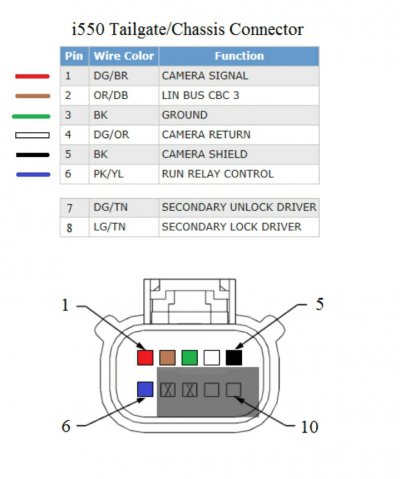
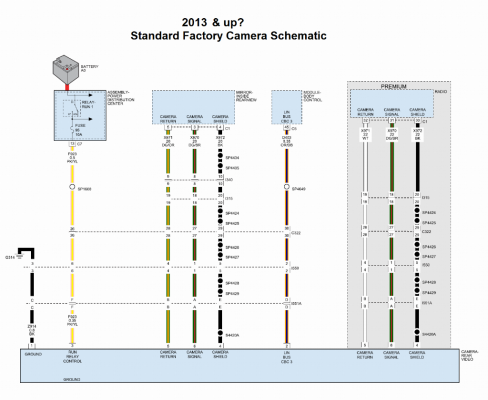
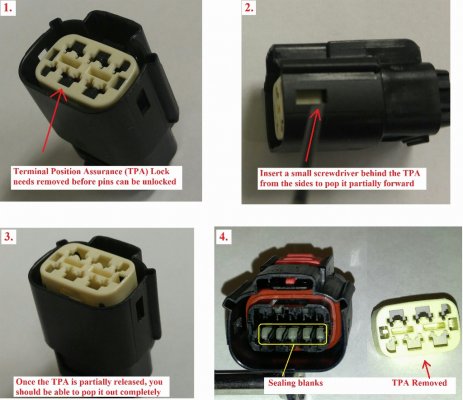
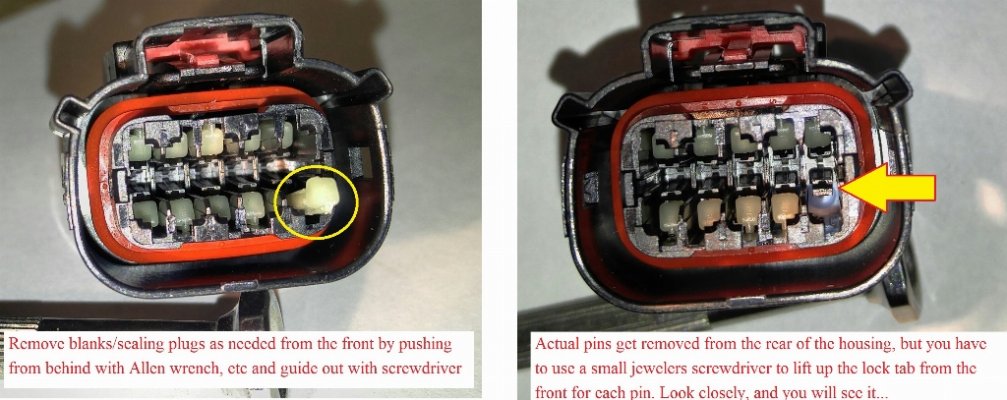
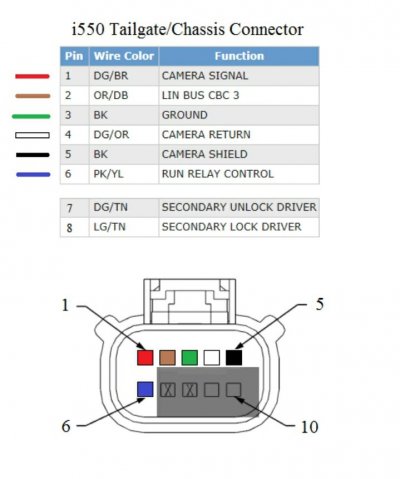
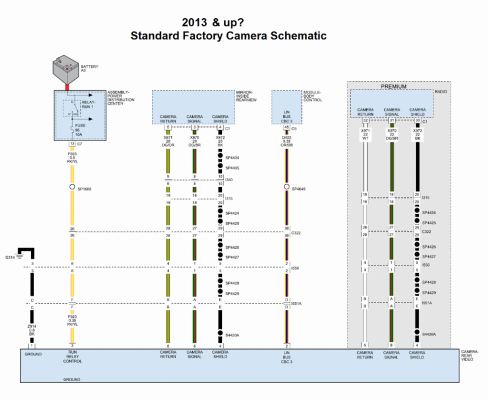
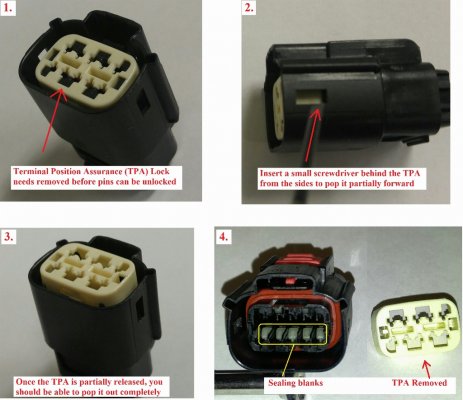
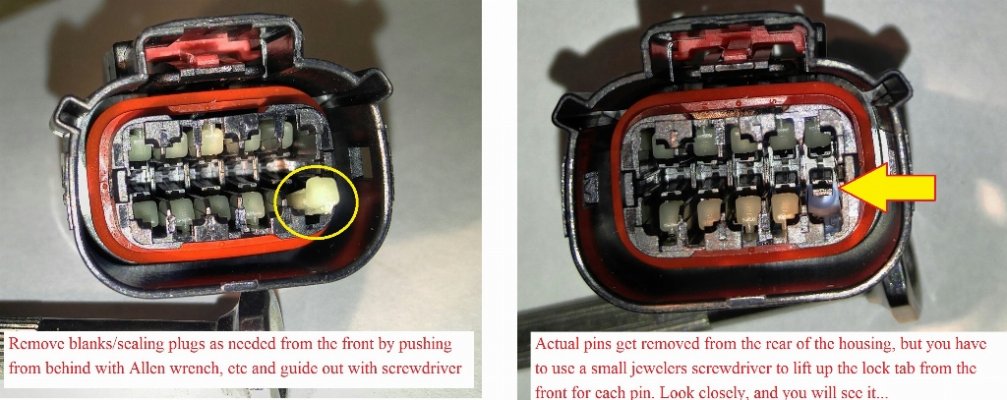
Try depinning/disconnecting the LIN BUS CBC3 signal (from BCM C5/e-45) to the camera at the 8pin tailgate connector (pin 2 org/DB wire)... As long as the radio will switch to the input (ie blank screen in reverse), the camera should be forced to send it a video signal although it will be without the gridlines. (Camera will output video as long as the truck is running)

I'll edit this post with more information once I find the details....
(Related camera thread post 919)

Edit:

Wire insertion side
(ignore my added colors from another project)

05ffd51cea739c098cee202045468223.jpg


c419d6be9874f9d6cd043fd1c1dbc4f5.png8fbbe5046b141fd9e45e705552dc5666.jpg1190d468b7819a51a7ffdd8712647821.jpg
 
Last edited:

Jimmy07

Senior Member
Joined
Feb 23, 2017
Posts
3,512
Reaction score
3,565
Ram Year
2017
Engine
6.4 Hemi
after ours an hours and hundreds of dollars
No solution of actually been had
I believe a solution is possible but the amount of work and needed parts
To make it happen is an astronomical feet
The signal for the back up camera on an automatic truck comes from the TCm however
On a manual truck the signal comes from both the BCM Then it sent through the ECM re incoded
And then sent back to the Bcm
And then to the radio
I do believe if you switched out the ECM and the BCM it would work
However the hiccup is in 2018 they change the ABS and so that means you’re completely re-wiring and changing all of the sensors and the ABS computer too

what we really need is a module that we can use a manual input for that will force the radio to the camera image
Currently no module exist
The only thing with this line of thinking is- there is a member on cumminsforum with a 2018 G56 that originally came with the RA2 5” radio with a correctly functioning backup camera from the factory. He swapped in a UAQ from a 2018 Ram, and same issue as everyone else (so far 5 documented G56 UAQ/UAS swaps that I know of). So, what you’re thinking would have to mean there are different PCMs and BCMs between the same model year truck, transmission, and vehicle line, but different radios.
 

Mpgrimm2

Senior Member
Supporting Vendor Navy Badge
Joined
Mar 30, 2014
Posts
6,588
Reaction score
5,202
Location
SC
Ram Year
2022 Ram 1500 (5th Gen)
Engine
5.7L
Anyone know someone with a factory g56 UAQ truck to pull a working BCM config for compare?

M² Mods.
 

Jimmy07

Senior Member
Joined
Feb 23, 2017
Posts
3,512
Reaction score
3,565
Ram Year
2017
Engine
6.4 Hemi
Anyone know someone with a factory g56 UAQ truck to pull a working BCM config for compare?

M² Mods.
I did have one, but now I can’t find it. There were no relevant differences, but I’ll see if I can get that member to share it again.
 

Errol Smith

Member
Joined
Aug 19, 2020
Posts
36
Reaction score
65
Location
Sparks, NV
Ram Year
2013
Engine
Cummins 6.7
Just remembered this which may help...

Try depinning/disconnecting the LIN BUS CBC3 signal (from BCM C5/e-45) to the camera at the 8pin tailgate connector (pin 2 org/DB wire)... As long as the radio will switch to the input (ie blank screen in reverse), the camera should be forced to send it a video signal although it will be without the gridlines. (Camera will output video as long as the truck is running)

I'll edit this post with more information once I find the details....
(Related camera thread post 919)

Edit:

Wire insertion side
(ignore my added colors from another project)

05ffd51cea739c098cee202045468223.jpg


c419d6be9874f9d6cd043fd1c1dbc4f5.png8fbbe5046b141fd9e45e705552dc5666.jpg1190d468b7819a51a7ffdd8712647821.jpg

The backup camera works perfectly with the soft key right now. I even get the dynamic grid lines (they curve as I turn the wheel) so the camera itself is working. The only thing not working right is the radio deciding to turn on the backup camera when I switch to reverse.

Here's a quick breakdown of how it functions:
-Truck in neutral or any forward gear: When I press the camera soft key, the backup camera shows up on screen without grid lines. There's a message at the top that says "Camera System Unavailable"
-Truck in reverse: Grid lines show up the moment the truck goes into reverse. Grid lines are there regardless of already being in the camera or switching to camera while in reverse
-Truck back to neutral or forward gears: After shifting to reverse, my grid lines stick around for about 10 seconds. This was the backup camera delay I had a setting for in the old RA2 radio. My UAQ no longer has a setting for backup camera delay, though, and my AlfaOBD BCM doesn't have a setting to turn on the delay setting.
 

Errol Smith

Member
Joined
Aug 19, 2020
Posts
36
Reaction score
65
Location
Sparks, NV
Ram Year
2013
Engine
Cummins 6.7
The only thing with this line of thinking is- there is a member on cumminsforum with a 2018 G56 that originally came with the RA2 5” radio with a correctly functioning backup camera from the factory. He swapped in a UAQ from a 2018 Ram, and same issue as everyone else (so far 5 documented G56 UAQ/UAS swaps that I know of). So, what you’re thinking would have to mean there are different PCMs and BCMs between the same model year truck, transmission, and vehicle line, but different radios.

There's a guy here @RockyAEV who apparently did the UAQ upgrade on his 2018 w/ G56 and his backup camera works fine (I think). I reached out to him for his BCM config and am waiting to hear back.

I do agree that it doesn't seem entirely like it's a hardware thing. With how few G56 models they were selling having an entirely new set of hardware unique to the manuals just to make the backup camera work doesn't make much sense. The schematics for the 2018 match my 2013 almost exactly. The only difference being the security module sitting between the radio and the BCM on the 2018s. I can't figure out why this doesn't work, though, or why swapping in the 2018 BCM didn't fix it.

I wonder if there's a different firmware for the G56 UAQs....that's easier for a manufacturer to change than hardware.
 

Jimmy07

Senior Member
Joined
Feb 23, 2017
Posts
3,512
Reaction score
3,565
Ram Year
2017
Engine
6.4 Hemi
There's a guy here @RockyAEV who apparently did the UAQ upgrade on his 2018 w/ G56 and his backup camera works fine (I think). I reached out to him for his BCM config and am waiting to hear back.

I do agree that it doesn't seem entirely like it's a hardware thing. With how few G56 models they were selling having an entirely new set of hardware unique to the manuals just to make the backup camera work doesn't make much sense. The schematics for the 2018 match my 2013 almost exactly. The only difference being the security module sitting between the radio and the BCM on the 2018s. I can't figure out why this doesn't work, though, or why swapping in the 2018 BCM didn't fix it.

I wonder if there's a different firmware for the G56 UAQs....that's easier for a manufacturer to change than hardware.
I would say it has to be something with the radio. There was another member that bought the UAQ kit from infotainment for his G56, and it worked fine. He no longer has that truck to be able to get any info about it, though.
 

Errol Smith

Member
Joined
Aug 19, 2020
Posts
36
Reaction score
65
Location
Sparks, NV
Ram Year
2013
Engine
Cummins 6.7
I would say it has to be something with the radio. There was another member that bought the UAQ kit from infotainment for his G56, and it worked fine. He no longer has that truck to be able to get any info about it, though.

Well that's a shame but kinda points more towards a different firmware version. Mine's running 21.9 right now. Does anyone know if the G56 guys had tried a firmware upgrade on these radios? Anything I should be worried about if I try to upgrade to 22.6?
 

Errol Smith

Member
Joined
Aug 19, 2020
Posts
36
Reaction score
65
Location
Sparks, NV
Ram Year
2013
Engine
Cummins 6.7
The backup camera works perfectly with the soft key right now. I even get the dynamic grid lines (they curve as I turn the wheel) so the camera itself is working. The only thing not working right is the radio deciding to turn on the backup camera when I switch to reverse.

Here's a quick breakdown of how it functions:
-Truck in neutral or any forward gear: When I press the camera soft key, the backup camera shows up on screen without grid lines. There's a message at the top that says "Camera System Unavailable"
-Truck in reverse: Grid lines show up the moment the truck goes into reverse. Grid lines are there regardless of already being in the camera or switching to camera while in reverse
-Truck back to neutral or forward gears: After shifting to reverse, my grid lines stick around for about 10 seconds. This was the backup camera delay I had a setting for in the old RA2 radio. My UAQ no longer has a setting for backup camera delay, though, and my AlfaOBD BCM doesn't have a setting to turn on the delay setting.

Dunno if this means anything but camera behavior changed slightly when I put a 2018 backup camera in. I'd bought it a while ago for another project and decided to toss it in. I know @ManualCummins tried this without success but figured I'd give it a shot.

With the 2013 camera, my backup lines would disappear after the 10 second delay. With the 2018 camera, the lines don't go away at all. They're still dynamic (curving with the steering wheel input) they just don't disappear when I'm out of reverse.

Still doesn't turn on automatically when in reverse but I'll give it overnight to see if the behavior changes. This change in behavior might indicate that there's some sort of memory on the camera module itself? If nothing changes overnight, I'm going to try disconnecting battery negative for a bit and see if that changes things. Maybe letting the new camera register fresh with the truck will change things, I dunno.
 

Errol Smith

Member
Joined
Aug 19, 2020
Posts
36
Reaction score
65
Location
Sparks, NV
Ram Year
2013
Engine
Cummins 6.7
Dunno if this means anything but camera behavior changed slightly when I put a 2018 backup camera in. I'd bought it a while ago for another project and decided to toss it in. I know @ManualCummins tried this without success but figured I'd give it a shot.

With the 2013 camera, my backup lines would disappear after the 10 second delay. With the 2018 camera, the lines don't go away at all. They're still dynamic (curving with the steering wheel input) they just don't disappear when I'm out of reverse.

Still doesn't turn on automatically when in reverse but I'll give it overnight to see if the behavior changes. This change in behavior might indicate that there's some sort of memory on the camera module itself? If nothing changes overnight, I'm going to try disconnecting battery negative for a bit and see if that changes things. Maybe letting the new camera register fresh with the truck will change things, I dunno.

No change in behavior. Still won't switch to the camera when in reverse and the gridlines still show up all the time instead of just when I shift to reverse. Will try the battery pull when I get home from work tonight, wait a day, see if anything's different.

On a plus, my media hub showed up yesterday. It's running through a gaping hole I cut in my jump seat storage but Android Auto fired up without issue.
 

Errol Smith

Member
Joined
Aug 19, 2020
Posts
36
Reaction score
65
Location
Sparks, NV
Ram Year
2013
Engine
Cummins 6.7
Digging through schematics more, the security gateway on the 2018s might be the reason for this behavior (or lack thereof). The following schematics show the CAN-C and the CAN-IHS bus lines for the 2018 2500:
https://mopar1973man.com/external-media/image/4thgen/2018wiring/canbus/canc.png
https://mopar1973man.com/external-media/image/4thgen/2018wiring/canbus/canihs.png

Both of these show that the radio connects to the security gateway via a different CAN bus (CAN-C AT and CAN-IHS AT). Not sure what AT stands for in this but they felt the need to differentiate the CAN communication between the security gateway and the radio as something separate from the other modules on the network.

I'd accidentally bought a security gateway instead of an HVAC module when collecting parts for this upgrade and haven't returned it yet so I think I'll ohm it out on the CAN pins to see if this really is just a passthrough or if something's happening between. If this is just a passthrough then there should be continuity between 4-5 and 11-12 as well as 1-3 and 6-8 on the gateway module.

If there is a difference, I'd like to try putting this gateway between the vehicle CAN system and the radio's CAN inputs with a pigtail of some sort. @Mpgrimm2 I may be hitting you up for some radio connector info here soon.

From scouring the forums on this issue, I know @ManualCummins started down this path but I'm not sure how far he got into putting the security module into his truck.
 
Back
Top