
How To: Install a 2018 4C (UAQ/UAS) Radio in 2013 - 2017 RAM

Disclaimer: Links on this page pointing to Amazon, eBay and other sites may include affiliate code. If you click them and make a purchase, we may earn a small commission.

thrashie

Senior Member
Joined
May 22, 2013
Posts
213
Reaction score
77
Location
All Over
Ram Year
2013 2500 Laramie
Engine
6.7l cummins turbo diesel
So tonight I installed one of those cheap GPS antennas I took from the ford, I have the same result. Plugged it into the VP4, works without any issue, just asked for a recalibration. I then went ahead and installed the same antenna on the UAQ and still no GPS. I know the antenna works in the ford without an issue. I scanned for fault codes and I get none. Last thing I can think is that I have a faulty UAQ unit?? This is the 4th u it I am testing, but the first one with the correct part number. Others were from 2020 model rams with the new style unit.

VP4 is using the 3g module for GPS, how do i know? I desoldered that module from my radio, and now gps doesnt work.
you can unplug the 4g module in the UAQ, curious if it kills gps too..something to consider, i had not tried it, assume it does. But there's 3 antenna wires connected to the module, besides the ribbon cable.
there were replacement 4g modules on ebay, i dont' see any right now

just throwin that out there from left field.

i didn't have gps issue goin from vp4 to uaq, just hvac issues.

that module is how they track you and your info on your vehicle gets updated on Mopar.com on top of your uconnect options. if you don't subscribe, then get rid of it :p but if it runs the gps, which i assume it does...welllll....then things to think about.

lookie here on how to get to it.

 
Last edited:

Mpgrimm2

Senior Member
Supporting Vendor Navy Badge
Joined
Mar 30, 2014
Posts
6,589
Reaction score
5,204
Location
SC
Ram Year
2022 Ram 1500 (5th Gen)
Engine
5.7L
So Here are the details:

2015 RAM 1500. Factory fitted with VP4 & GPS, With mic's in headliner & rear view mirror, auto dimming rearview and drivers mirror, dual zone ATC with heated/cooled seats, remote start, backup camera and VR Buttons on steering wheel. No Cargo Cam (will be the next installation), but I do have a backup cam with displays on the radio itself.

Here is the original radio part number: 68238626AF. I replaced it with a UAQ part number 68331632AH. The new radio came out of a 2018 RAM 1500 and the build sheet clearly states apple car play and android auto with navigation. No additional parts have been installed or replaced, just the head unit for now. Just checked the truck this morning and all is working except for the GPS, besides that, no issues at all. Would it work if I checked with on of those amazon chinese GPS modules? I have one in the ford after upgrading to the sync 3 radio and cheap fakra GPS antenna.
So tonight I installed one of those cheap GPS antennas I took from the ford, I have the same result. Plugged it into the VP4, works without any issue, just asked for a recalibration. I then went ahead and installed the same antenna on the UAQ and still no GPS. I know the antenna works in the ford without an issue. I scanned for fault codes and I get none. Last thing I can think is that I have a faulty UAQ unit?? This is the 4th u it I am testing, but the first one with the correct part number. Others were from 2020 model rams with the new style unit.
I'll send you a message shortly.
 

Justinb107

Junior Member
Joined
Jan 25, 2022
Posts
12
Reaction score
3
Location
Nova Scotia, Canada
Ram Year
2015
Engine
5.7 Hemi
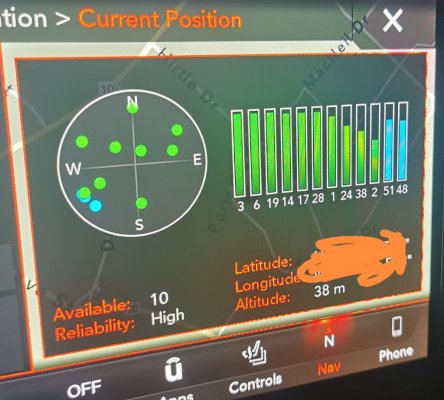
Firstly, thanx for the replies, I have found the issue with the GPS. I found a post on the Wrangler Forum. I simply transplanted the 4G modem from out of a new version UAQ where the module and screen are seperate units, 2021+ RAM, not sure on exact year model. Plugged everything back in and worked like a charm, GPS showed my location instantly.

Looking back, I do remember seeing a few things which indicated that the module was not working.

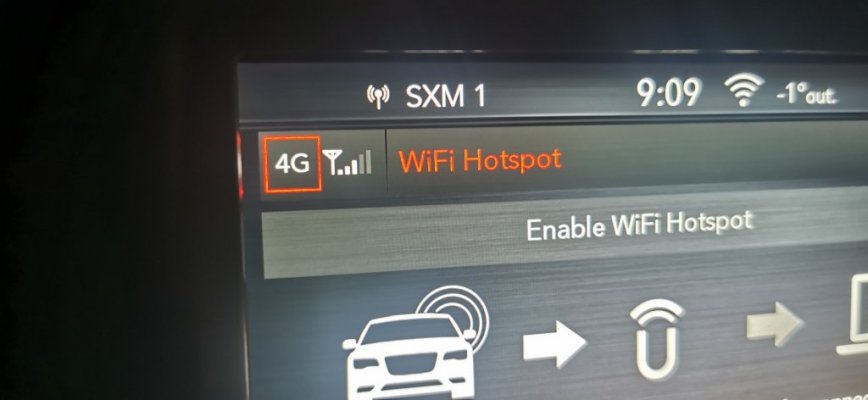
1) I had no WIFI being broadcasted from the truck
2) No LTE or 4G being displayed in the upper left corner.

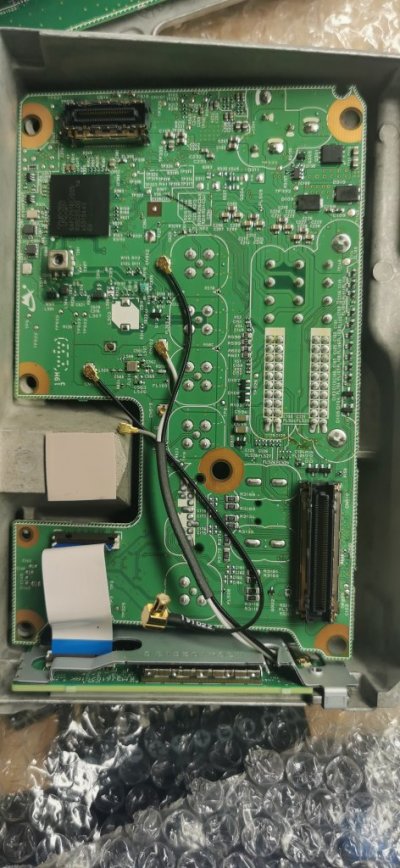
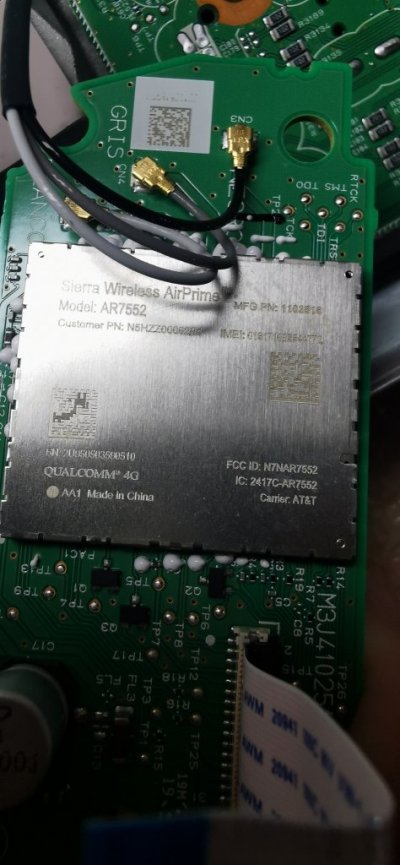
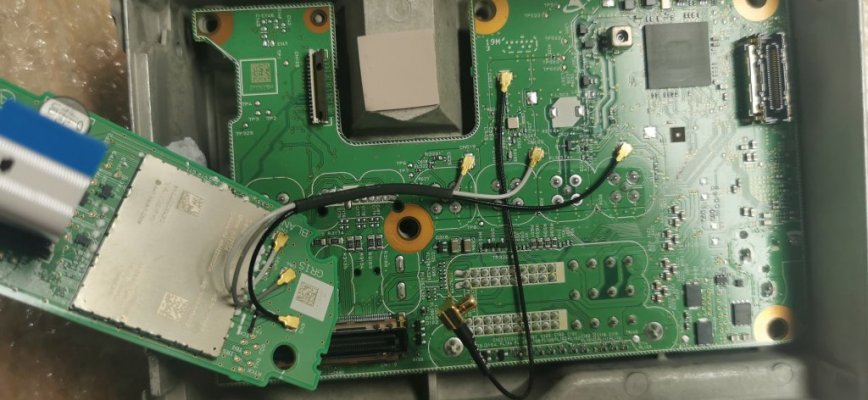
After the install, everything started showing as it should. I just need to replace the thermal paste. The 4G modem is located on the side of the back lid, held in with a metal plate. Need to be gentle as there are 3 wires, a ribbon cable and 2 additional pc boards - apologies for not taking better pics of the swop over.

From what I can gather, the 4G and GPS/SIRI antenna work together as a unit. It could also be that a connector came loose, so check those before replacing anything. I am neither sure if these modems can be purchased seperately or need programming, for me, it was plug and play. Hopefully this would help some others out there!
 

Attachments

  • IMG_20220207_201239.jpg
    IMG_20220207_201239.jpg
    136.2 KB · Views: 13
  • IMG_20220207_201540.jpg
    IMG_20220207_201540.jpg
    93 KB · Views: 13
  • IMG_20220207_203059.jpg
    IMG_20220207_203059.jpg
    111.7 KB · Views: 13
  • IMG_20220207_214129.jpg
    IMG_20220207_214129.jpg
    142.6 KB · Views: 14
  • IMG_20220207_210926.jpg
    IMG_20220207_210926.jpg
    48.1 KB · Views: 14

Justinb107

Junior Member
Joined
Jan 25, 2022
Posts
12
Reaction score
3
Location
Nova Scotia, Canada
Ram Year
2015
Engine
5.7 Hemi
So I managed to activate the wifi function on the UCQ. Since it is a Canadian radio, I had to provide the VIN number from which the 4G board came and is not tied to my own vehicle vin or the radio. For those purchasing from someone like infotainment, this might be an issue if the radio parts were changed between various units. I assume that the actual chip is programmed to AT&T at the factory when the vehicle is built.

Wifi seems to be buggy on my current FW version where no signal is broadcasted until I change the wireless name.

Next, I will try and activate the guardian service which not many have been able to do.
 

Sking80

Senior Member
Supporting Member
Joined
Aug 18, 2021
Posts
131
Reaction score
54
Location
Atlanta Ga
Ram Year
2019
Engine
5.7 HEMI
Is that a contract or monthly on the Wi-Fi?
 

Sking80

Senior Member
Supporting Member
Joined
Aug 18, 2021
Posts
131
Reaction score
54
Location
Atlanta Ga
Ram Year
2019
Engine
5.7 HEMI
Oh ok Im planning a family trip and thought about the Wi-Fi to give the kids access to play on there tablets during the long drive. Think I will wait and do the trial for the trip
 

Justinb107

Junior Member
Joined
Jan 25, 2022
Posts
12
Reaction score
3
Location
Nova Scotia, Canada
Ram Year
2015
Engine
5.7 Hemi
What FW do you currently have
You get a 1GB trial valid for 3 months if not mistaken. I am on FW 19.X. Waiting on a USB hub and hoping to do an uograde to something later. Not sure if it is worth upgrading as for now all soft buttons and features work. I have just noticed that the comfort features for remote start stopped working when I switched out the connector board with a newer unit - I broke off one of the ear pieces from the board today while disconnecting the modem to apply new thermal paste. Hoping it is just a BCM setting that went out of wack
 

skydog

Junior Member
Joined
Sep 4, 2019
Posts
21
Reaction score
11
Location
Canada
Ram Year
2016
Engine
EcoDiesel 3.0
I've been working at getting my 2016 upgraded to a 2018 UAS for CarPlay functionality for a few days now and would like to add the UAS seems to be finicky as to which multi media hub is used.

There have been posts here that suggest P/N 68397098AE will work and I can confirm through a member that was helping me out that it does. It just didn't work for me.

Spent hours rebooting, battery disconnects and research only to discover the 2018 hub from the donor truck was the money. The head refused to acknowledge any device connected to the USB port. As soon as I had the hub installed and phone plugged in, bingo. Full CarPlay bliss.

Truck is a Canadian 2016 EcoDiesel manufactured 05/16. I don't have a radio P/N but it came out of a 2018 Ram exactly same specs/options as mine, just newer. When installed Application # was NN-IR-19.9.0-20171026-107G. I have since successfully updated that to v22.6 via link here:https://www.mediafire.com/file/k4xat04ppdb2hqp/VP4R_Update_(2).zip/fileI from Mpgrimm's INFO -2013-2018 8.4 / AN FW Notes post #7

Recommend you read the TSB (same page) before updating. There's a different approach for this head than the VP3.

Next up, is finding a way to mount that hub.

I want to thank the members that made suggestions and responded to my PMs and especially MpGrimm for taking the time to work with me to diagnose and troubleshoot. Dude, you're a rockstar!

Cheers,

Skydog
 
Last edited:

Mpgrimm2

Senior Member
Supporting Vendor Navy Badge
Joined
Mar 30, 2014
Posts
6,589
Reaction score
5,204
Location
SC
Ram Year
2022 Ram 1500 (5th Gen)
Engine
5.7L
I've been working at getting my 2016 upgraded to a 2018 UAS for CarPlay functionality for a few days now and would like to add the UAS seems to be finicky as to which multi media hub is used.

There have been posts here that suggest P/N 68397098AE will work and I can confirm through a member that was helping me out that it does. It just didn't work for me.

Spent hours rebooting, battery disconnects and research only to discover the 2018 hub from the donor truck was the money. The head refused to acknowledge any device connected to the USB port. As soon as I had the hub installed and phone plugged in, bingo. Full CarPlay bliss.

Next up, is finding a way to mount that hub.

I want to thank the members that made suggestions and responded to my PMs and especially MpGrimm for taking the time to work with me to diagnose and troubleshoot. Dude, you're a rockstar!

Cheers,

Skydog
Glad the actually 2018 Ram USB Hub from the op got you up and running.

* If you get the chance, edit your previous post above with the "Application Version" andnd radio PN/model your radio is running *

It's possible the reason the other 2019+ 5th Gen dual USB A/Dual USB C Hub worked for the limited few people that tried it is because their radio was on newer Application Version with newer USB drivers. (latest is v39.6.x)

Without a mounting flange/faceplate and the potential driver issues, I can't recommend using it.
 

Athlium

Senior Member
Joined
Dec 13, 2021
Posts
169
Reaction score
89
Location
Tacoma, WA
Ram Year
2018
Engine
3.0L EcoDiesel
2018 5in to 8.4 upgrade here. I got my harness kit from @Mpgrimm2 today 8.4 (68331635AK) finally working with audio control. Enabled tail gate camera and waited 3 hrs to get the softkey. Android auto keeps on getting communication error 8 with existing hub (1 usb and 1 power).

phone is a 3 week old s20 FE. I have deleted all the old phones out of 8.4 and have re-install AA and Google play.

Gonna try to upgrade to different hub and see if that helps.
 

WhiteNight

Member
Joined
Jan 22, 2019
Posts
38
Reaction score
19
Location
Orlando, FL
Ram Year
2017
Engine
HEMI 5.7L V8
Hey all - I just skimmed a dozen or so pages of this thread, and man I feel disheartened about trying to upgrade to a Carplay radio now. Is there a straightforward solution at this point to upgrade from a 2017 8.4 (no NAV) to a UAS or UAQ? I can't believe what Infotainment is charging at this point, and it seems even their solution may not be 100% guaranteed.
 

Mpgrimm2

Senior Member
Supporting Vendor Navy Badge
Joined
Mar 30, 2014
Posts
6,589
Reaction score
5,204
Location
SC
Ram Year
2022 Ram 1500 (5th Gen)
Engine
5.7L
Hey all - I just skimmed a dozen or so pages of this thread, and man I feel disheartened about trying to upgrade to a Carplay radio now. Is there a straightforward solution at this point to upgrade from a 2017 8.4 (no NAV) to a UAS or UAQ? I can't believe what Infotainment is charging at this point, and it seems even their solution may not be 100% guaranteed.

It's cheaper usually to get the parts yourself (get Mopar parts from forum vendor AllMoparParts) and then get the needed harnesses me if needed...

There's not reallya straightforward answer because it depends on your each person's truck Year/model/trim and features.vMay seem redundant, but....

Factory installed 2017 8.4 Radio with Dual Zone ATC ?

1500 or 2500?


What year/model 8.4 radio you plan to use?
(2018/19+ classic 4th Gen Ram UAS/UAQ... Actual PNs please),


Do you have a Backup Camera/Cargo Cam? (Where do they display?)


What parts, if any have you bought?
(Actual PNs help)
 

Gordo2212

Senior Member
Joined
Aug 23, 2021
Posts
244
Reaction score
122
Location
Mississippi
Ram Year
2018 3500 Tradesman
Engine
6.4 L Hemi
Hey all - I just skimmed a dozen or so pages of this thread, and man I feel disheartened about trying to upgrade to a Carplay radio now. Is there a straightforward solution at this point to upgrade from a 2017 8.4 (no NAV) to a UAS or UAQ? I can't believe what Infotainment is charging at this point, and it seems even their solution may not be 100% guaranteed.
It’s really not that bad. I did this upgrade in the fall on my 2018. It seems like a lot but it’s been figured out at this point by the folks on this thread. Don’t worry about Infotainment you’ll get much better support if you go start to finish using the help from this forum and @Mpgrimm2

As he said it’ll also be much cheaper sourcing the parts yourself. The radio will be the hardest part. There was a UAS for sale over at Schram auto a few weeks ago it may still be there. You just have to be diligent and keep your eyes out on the for sale thread here and other parts sites.
 

Ryno1500

Senior Member
Joined
May 11, 2021
Posts
112
Reaction score
56
Location
California
Ram Year
2019
Engine
Hemi 5.7 eTorque
Hey all - I just skimmed a dozen or so pages of this thread, and man I feel disheartened about trying to upgrade to a Carplay radio now. Is there a straightforward solution at this point to upgrade from a 2017 8.4 (no NAV) to a UAS or UAQ? I can't believe what Infotainment is charging at this point, and it seems even their solution may not be 100% guaranteed.
It's seriously one of the easiest upgrades you'll do.
 

Athlium

Senior Member
Joined
Dec 13, 2021
Posts
169
Reaction score
89
Location
Tacoma, WA
Ram Year
2018
Engine
3.0L EcoDiesel
I would imagine that from you are from from 8.4 to 8.4.. there isn't much that's needed. newer radio, and @Mpgrimm2 harness kit should get you set.
 

cleancl

Junior Member
Joined
Feb 12, 2022
Posts
2
Reaction score
2
Location
USA
Hi ya'll, I went through and installed a brand new 68331631AM along with the Mpgrimm2 adapter and USB Media Hub. Smooth install and booted up super fast with all the settings appeared to be there. The issue is there is no audio playing through the speakers from any source EXCEPT when I touch the screen. The screen feedback beep plays along with whatever audio is playing for a split second while the feedback noise plays.

I can't seem to find any thread on here that cites a similar experience. I'm kind of stumped. The application version on the radio appears to be very new and not discussed since the part numbers have recently changed over. I wonder if this is a gotcha with the newer part? Anyone else had this happen?

Thanks in advance.
 

cleancl

Junior Member
Joined
Feb 12, 2022
Posts
2
Reaction score
2
Location
USA
Hi ya'll, I went through and installed a brand new 68331631AM along with the Mpgrimm2 adapter and USB Media Hub. Smooth install and booted up super fast with all the settings appeared to be there. The issue is there is no audio playing through the speakers from any source EXCEPT when I touch the screen. The screen feedback beep plays along with whatever audio is playing for a split second while the feedback noise plays.

I can't seem to find any thread on here that cites a similar experience. I'm kind of stumped. The application version on the radio appears to be very new and not discussed since the part numbers have recently changed over. I wonder if this is a gotcha with the newer part? Anyone else had this happen?

Thanks in advance.

Well, self-resolved. I pulled the negative battery terminal cables again and let it sit that way while I changed the filters out and cleaned the engine bay. All fixed. Working beautifully so far.
 
Back
Top