

INFO - 2013-2018 8.4A /AN FW Notes (RA3/VP3-NA & RA4/VP4-NA & UAx)

Disclaimer: Links on this page pointing to Amazon, eBay and other sites may include affiliate code. If you click them and make a purchase, we may earn a small commission.

SitKneelBend

Moderator
Staff member
Member Relations Specialist
Moderator Supporting Member Marine Corps
Joined
Jan 8, 2015
Posts
10,987
Reaction score
7,679
Location
St. Louis
Ram Year
2014
Engine
3.6 Pentastar
Check ...

Yes, I understand the old hub should work with the new radio. One of the early posts in this thread said Infotainment has a pricey update that would enable the USB ports. But nothing except Bluetooth shows on the media screen, and the USB ports charge, but don’t have any USB functions.
So… I was asking if there is a way to enable the USB without the Infotainment option. I do have an OBDMX+ elm327 that is very good, and a lot of software can be used with it. Can AlphaOBD be used to enable the USB ports, or how would this be accomplished? Ports show up still on my oem radio, 2013 Uconnect 8.4 VP3 CA.
Charlie

You will have to explain this post, not sure what it is showing me, but it looks like a drop down menu in an app…
Charlie
That post is the AlfaOBD setting to check first. He thinks maybe the setting isn't configured so maybe once you set it, it will read.
 

SitKneelBend

Moderator
Staff member
Member Relations Specialist
Moderator Supporting Member Marine Corps
Joined
Jan 8, 2015
Posts
10,987
Reaction score
7,679
Location
St. Louis
Ram Year
2014
Engine
3.6 Pentastar
Ah, ok! I will get the software, and see if that will do the trick! Thanks to both of you
Merry Christmas!
Charlie
Post here what the current value is when you get it and I'll tell you what it should be (a picture of your current hub will help too)
 

2016 2500

Member
Air Force
Joined
Mar 21, 2025
Posts
98
Reaction score
119
Location
Florida
Ram Year
2016
Engine
6.7 Cummins
Where is this ECUConfig 3 found? I am new to AlphaOBD but I have looked in every Radio setting, and this has to be hiding somewhere else, in plain sight, lol.
Charlie
even though it might sound odd, all those settings are in the body control module, when you open alphaobd you will choose body control then scroll down till you find car config settings, this will bring up a submenu in that is where you should find the setting they are talking about.
 

SitKneelBend

Moderator
Staff member
Member Relations Specialist
Moderator Supporting Member Marine Corps
Joined
Jan 8, 2015
Posts
10,987
Reaction score
7,679
Location
St. Louis
Ram Year
2014
Engine
3.6 Pentastar
Where is this ECUConfig 3 found? I am new to AlphaOBD but I have looked in every Radio setting, and this has to be hiding somewhere else, in plain sight, lol.
Charlie
In AlfaOBD:

1. Select Dodge/Ram -> Ram 1500 (DS/DX/DT)-> Body Computer -> Body Computer MY2016+Powernet ->

2. (Next Screen) Connect -> (once connected) Select the Car with the Hood Up Icon ->

3. (Next Screen) select procedure to start drop down ->

4. (scroll nearly all the way to the bottom and select "Car Configuration Change" ->

5. select option from the bottom drop down and scroll to "ECU Config 3" or search for "external" at the top search bar to open the "ECU Config 3: External Port Type" Option

6. On this Page Select "Aux + USB" from the Select Value dropdown.

7. Select "Start" BUT STOP HERE! Take a screenshot of the next screen and take note of what AlfaOBD says the current value is go no further and exit AlfaoBD.


Side note, if you haven't already made a backup of your settings you should do so now before making any changes. Doing so can avoid a trip to a paid trip to the dealership and/or hours of troubleshooting when you can't find a change you made. For detail on that check my other post (linked below) but feel free to ask questions here...

 
Joined
Aug 13, 2025
Posts
33
Reaction score
34
Location
Ohio
Ram Year
2013
Engine
Hemi 5.7
I found the car config info on a Google search, but wasn’t sure where it is. I saw the BCM menu selection, so I will check that out. Also, not sure how to back up the configuration settings, but will Google that also.
One thing, I have a SuperChips tune on this ECU, and initially I had to have the ECU sent to Holley to marry the tuner and ECU, as it bricked my truck and it wouldn’t start. Evidently, 2013 ECU is prone to that with the SuperChips tuner. Question: do I have to return the ECU to stock tune before using the AlphaOBD and changing anything?
Thanks, Charlie
EDIT: I found the link that you left as to how I would save the config. Thanks!!
 
Last edited:
Joined
Aug 13, 2025
Posts
33
Reaction score
34
Location
Ohio
Ram Year
2013
Engine
Hemi 5.7
Took a couple screenshots…
The config for the USB WASN’T set, but I did find where to change it. My USB hub is 2 USB, audio input, and SDCard. That would be the selection I would use, I believe. I did backup the ECU, but couldn’t figure out how to make the PDF, as that option doesn’t show on my Android version of AlphaOBD…
Charlie
EDIT - I noticed you said to select BODY COMPUTER MY2016 +Powernet... My truck is a 2013, and there are three configurations for that. My radio is a 2017. What would be the reason to select the Body Computer MY2016+Powernet?
 

Attachments

  • Screenshot_20251224_091607_AlfaOBD.jpg
    Screenshot_20251224_091607_AlfaOBD.jpg
    102.1 KB · Views: 2
  • Screenshot_20251224_091338_AlfaOBD.jpg
    Screenshot_20251224_091338_AlfaOBD.jpg
    65.2 KB · Views: 3
Last edited:

SitKneelBend

Moderator
Staff member
Member Relations Specialist
Moderator Supporting Member Marine Corps
Joined
Jan 8, 2015
Posts
10,987
Reaction score
7,679
Location
St. Louis
Ram Year
2014
Engine
3.6 Pentastar
Took a couple screenshots…
The config for the USB WASN’T set, but I did find where to change it. My USB hub is 2 USB, audio input, and SDCard. That would be the selection I would use, I believe. I did backup the ECU, but couldn’t figure out how to make the PDF, as that option doesn’t show on my Android version of AlphaOBD…
Charlie
EDIT - I noticed you said to select BODY COMPUTER MY2016 +Powernet... My truck is a 2013, and there are three configurations for that. My radio is a 2017. What would be the reason to select the Body Computer MY2016+Powernet?
No reason, I misread 2016 somewhere I think. That's probably the least important part as when you connect it will select the right year...sorry about that.

You will select the USB/Aux/SD like you thought. That will likely fix your issue.
 
Joined
Aug 13, 2025
Posts
33
Reaction score
34
Location
Ohio
Ram Year
2013
Engine
Hemi 5.7
Ok, thanks! I appreciate the help. Now... about the SuperChips tuner, will it matter to use the AlphaOBD with the modified tune? Just curious, as it modifies the ECU for engine timing, fuel injection, and transmission shift points. I will activate the USB ports and see if they work. Thanks again, and Merry Christmas!
Charlie
 
Joined
Aug 13, 2025
Posts
33
Reaction score
34
Location
Ohio
Ram Year
2013
Engine
Hemi 5.7
Success! Hallelujah!!
I used the MY2013 +Powernet, and selected the two USB, Aux and SDCard, and it's all working. This is amazing! I have an older iPod that works, a SDCard with MP3's and it all works great! Alpha OBD is the BeesKnees, lol. And you guys are amazing. Thank you for your willingness to help. It is very appreciated.
If you are ever in the Toledo area, hit me up, and I will buy you an adult beverage, lol.
Charlie
 

2016 2500

Member
Air Force
Joined
Mar 21, 2025
Posts
98
Reaction score
119
Location
Florida
Ram Year
2016
Engine
6.7 Cummins
Ok, thanks! I appreciate the help. Now... about the SuperChips tuner, will it matter to use the AlphaOBD with the modified tune? Just curious, as it modifies the ECU for engine timing, fuel injection, and transmission shift points. I will activate the USB ports and see if they work. Thanks again, and Merry Christmas!
Charlie
I would guess you already figured this out, No this doesn't interfere with the superchips tune, from what I can tell even in the engine page of alphaobd you can't change the tune that is another part of the ecu not directly accessable.
 

SitKneelBend

Moderator
Staff member
Member Relations Specialist
Moderator Supporting Member Marine Corps
Joined
Jan 8, 2015
Posts
10,987
Reaction score
7,679
Location
St. Louis
Ram Year
2014
Engine
3.6 Pentastar
I would guess you already figured this out, No this doesn't interfere with the superchips tune, from what I can tell even in the engine page of alphaobd you can't change the tune that is another part of the ecu not directly accessable.
Actually I have no idea. I bet the seller would know though. I could imagine it being possible depending on how they achieve their tune BUT AlfaOBD is not capable of altering the ECM.
 

04fxdwgi

Senior Member
Joined
May 19, 2023
Posts
1,806
Reaction score
3,804
Location
Coastal NE North Carolina
Ram Year
2016 1500 Sport
Engine
5.7 Hemi
Took a couple screenshots…
The config for the USB WASN’T set, but I did find where to change it. My USB hub is 2 USB, audio input, and SDCard. That would be the selection I would use, I believe. I did backup the ECU, but couldn’t figure out how to make the PDF, as that option doesn’t show on my Android version of AlphaOBD…
Charlie
EDIT - I noticed you said to select BODY COMPUTER MY2016 +Powernet... My truck is a 2013, and there are three configurations for that. My radio is a 2017. What would be the reason to select the Body Computer MY2016+Powernet?
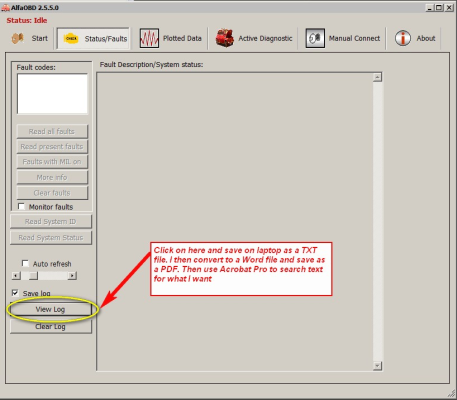
To make the PDF, go here:

1766654502530.png
 
Joined
Aug 13, 2025
Posts
33
Reaction score
34
Location
Ohio
Ram Year
2013
Engine
Hemi 5.7
That would be correct, but I do not have the Windows PC version of Alpha OBD... just the Android.
And yes, I figured out that I could add the USB, etc without it messing with the tune. Thanks!
Charlie
 

SitKneelBend

Moderator
Staff member
Member Relations Specialist
Moderator Supporting Member Marine Corps
Joined
Jan 8, 2015
Posts
10,987
Reaction score
7,679
Location
St. Louis
Ram Year
2014
Engine
3.6 Pentastar
That would be correct, but I do not have the Windows PC version of Alpha OBD... just the Android.
And yes, I figured out that I could add the USB, etc without it messing with the tune. Thanks!
Charlie
In that link I posted are directions to output the backups to your Google Drive in text form. Do it now before you really get into AlfaOBD (trust me)...
 
Joined
Aug 13, 2025
Posts
33
Reaction score
34
Location
Ohio
Ram Year
2013
Engine
Hemi 5.7
Ok, cool! I went back and found that info, will make the backup today.
So far, it’s working great, and the pop up of the Vehicle radio error didn’t happen at all the first time I drove the truck. Subsequent trips popped it up once or twice, but it isn’t displaying that error when selecting radio or SXM, which it did every time I swapped from one to the other.
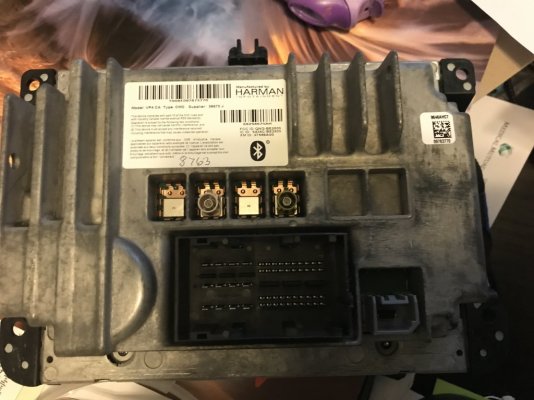
Question: the back of the 2017 radio has three connections for the antennas… but the third one is dark red. Is this a camera input? The other two are the same color as the 2013 radio, and the same locations, light tan, and gray. So, I used those two. This is the back of the 2016 8.4 VP4 CA, it’s the same as my 2013 VP3 CA. The 2017 has a third dark red one in the far right area.
Charlie
 

Attachments

  • image.jpg
    image.jpg
    118.9 KB · Views: 0

SitKneelBend

Moderator
Staff member
Member Relations Specialist
Moderator Supporting Member Marine Corps
Joined
Jan 8, 2015
Posts
10,987
Reaction score
7,679
Location
St. Louis
Ram Year
2014
Engine
3.6 Pentastar
Ok, cool! I went back and found that info, will make the backup today.
So far, it’s working great, and the pop up of the Vehicle radio error didn’t happen at all the first time I drove the truck. Subsequent trips popped it up once or twice, but it isn’t displaying that error when selecting radio or SXM, which it did every time I swapped from one to the other.
Question: the back of the 2017 radio has three connections for the antennas… but the third one is dark red. Is this a camera input? The other two are the same color as the 2013 radio, and the same locations, light tan, and gray. So, I used those two. This is the back of the 2016 8.4 VP4 CA, it’s the same as my 2013 VP3 CA. The 2017 has a third dark red one in the far right area.
Charlie
It is unused on Ram Trucks of your model year (dark rad fakra). Can you post a picture of the error you are getting?
 

2016 2500

Member
Air Force
Joined
Mar 21, 2025
Posts
98
Reaction score
119
Location
Florida
Ram Year
2016
Engine
6.7 Cummins
Ok, cool! I went back and found that info, will make the backup today.
So far, it’s working great, and the pop up of the Vehicle radio error didn’t happen at all the first time I drove the truck. Subsequent trips popped it up once or twice, but it isn’t displaying that error when selecting radio or SXM, which it did every time I swapped from one to the other.
Question: the back of the 2017 radio has three connections for the antennas… but the third one is dark red. Is this a camera input? The other two are the same color as the 2013 radio, and the same locations, light tan, and gray. So, I used those two. This is the back of the 2016 8.4 VP4 CA, it’s the same as my 2013 VP3 CA. The 2017 has a third dark red one in the far right area.
Charlie
I am by no means an expert in these, but you have your white regular am/fm radio, your Gps and xm radio, and then your cell input. I think some radio's might have some of those through another/ you split your gps xm perhaps. Or they just use diversity antenna's
 
Joined
Aug 13, 2025
Posts
33
Reaction score
34
Location
Ohio
Ram Year
2013
Engine
Hemi 5.7
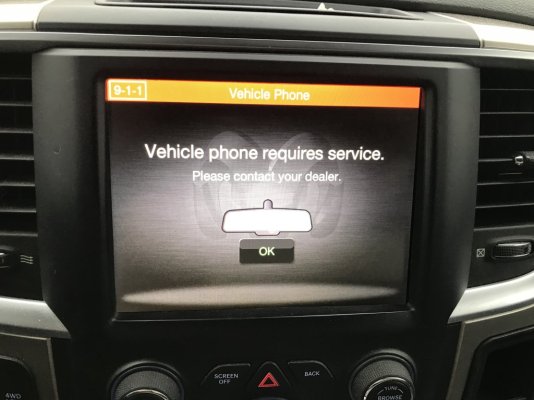
Here’s a photo of the error. I,was told a dummy antenna could be use to eliminate the error.
Charlie
 

Attachments

  • image.jpg
    image.jpg
    113.1 KB · Views: 3
Back
Top