

You are using an out of date browser. It may not display this or other websites correctly.
You should upgrade or use an alternative browser.
You should upgrade or use an alternative browser.
DIY: 2013-2016 (some 17-18) RearView Mirror Upgrade & Harness install
- Thread starter Mpgrimm2
- Start date
Disclaimer: Links on this page pointing to Amazon, eBay and other sites may include affiliate code. If you click them and make a purchase, we may earn a small commission.
Policeboss
Member
I have confirmed use of auto dim mirror with mics, with rear view camera in both locations. Two views of the same backup camera. One on the mirror and other on 5.0 radio screen at the same time. Also I was able to use my factory headliner harness, no new harness needed. You also will however need Mpgrimm2 reroute harness for the video feed to the radio 5.0 I’ll post pics at some point. Only way I could tell from a used 911 mirror was to pop it open to see if it had the video display interface inside. Always ask questions about these 911/assist mirrors as some or most don’t have the video interface. But they’re some out there. I’ll up date this thread with pics and data as soon as I can. Don’t jump the gun and run out to buy a 911 mirror without investigating the internal parts. So this was the basic installation for me. 1.) pop off my mirror that had rear view camera only, no mics. 2.) plug up 911/assist mirror that has rear view camera and mics. Done. Took 5 mins. Both camera and voice work perfectly. Once again I will update this thread with more info as time permits. Also this wouldn’t be possible without guidance and harness from pal MpGrimm2...This was done on a 2016 Ram 1500 and I’m uncertain about other models.
I'm interested in your rearview mirror upgrade. I'm looking for a part number for the 911/assist mirror with the video interface you mentioned. Not sure what the interface looks like. Do you have any pictures? or Part Numbers
Thanks Karry
Canadian Mopar
Senior Member
- Joined
- Mar 18, 2018
- Posts
- 109
- Reaction score
- 51
- Location
- Alberta
- Ram Year
- 2017 2500 SLT
- Engine
- 6.4L HEMI
So for a 2017 2500 I'd need the header harness 68309102AA? Even though I don't have cab lights, or will that cause a problem? Or could I use 68343002AA/68343004AA?
And just making sure, the HDs don't have a humidity sensor in the harness, I'm assuming it's somewhere else?
And just making sure, the HDs don't have a humidity sensor in the harness, I'm assuming it's somewhere else?
OP
OP



- Joined
- Mar 30, 2014
- Posts
- 6,589
- Reaction score
- 5,202
- Location
- SC
- Ram Year
- 2022 Ram 1500 (5th Gen)
- Engine
- 5.7L
The 2500/3500's have a standard compressor and do not have a humidity sensor on any trim level.So for a 2017 2500 I'd need the header harness 68309102AA? Even though I don't have cab lights, or will that cause a problem? Or could I use 68343002AA/68343004AA?
And just making sure, the HDs don't have a humidity sensor in the harness, I'm assuming it's somewhere else?
As you see, I do not have a 17/18 upgraded mirror harness PN yet for your situation. Your could use one of the 13-16 PNs that would just have the extra wires for the mics (unused).
You could do the same thing with the 17/18 harness with the cab lights and not hook them up.
Or, you can contact forum vendor @AllMoparParts.com (Benny) and see if he can find you a correct harness PN for your year/options. If your can find the vin from a 17-18 2500 with the correct options you need (8.4 radio, no cab lights), he will be able to get the PN much easier.
If you do id the PN, please come back and share the info and I will update the posts.
M² Mods.
OP
OP
- Joined
- Mar 30, 2014
- Posts
- 6,589
- Reaction score
- 5,202
- Location
- SC
- Ram Year
- 2022 Ram 1500 (5th Gen)
- Engine
- 5.7L
@Canadian Mopar
PS:
I had a pn for a 13 ram 1500 Laramie mirror header harness somewhere that only adds the rain sensor (13's have the same HVAC system as the 2500's... No humidity sensor ... But with the mic wires that you wouldn't need).
I will see if I can find the sheet of paper with it when I get back. Took a picture of the harness but can't find it either.
M² Mods.
PS:
I had a pn for a 13 ram 1500 Laramie mirror header harness somewhere that only adds the rain sensor (13's have the same HVAC system as the 2500's... No humidity sensor ... But with the mic wires that you wouldn't need).
I will see if I can find the sheet of paper with it when I get back. Took a picture of the harness but can't find it either.
M² Mods.
Canadian Mopar
Senior Member
- Joined
- Mar 18, 2018
- Posts
- 109
- Reaction score
- 51
- Location
- Alberta
- Ram Year
- 2017 2500 SLT
- Engine
- 6.4L HEMI
@Canadian Mopar
PS:
I had a pn for a 13 ram 1500 Laramie mirror header harness somewhere that only adds the rain sensor (13's have the same HVAC system as the 2500's... No humidity sensor ... But with the mic wires that you wouldn't need).
I will see if I can find the sheet of paper with it when I get back. Took a picture of the harness but can't find it either.
M² Mods.
Alright awesome, thanks!
CincyCuda68
Senior Member
What Alfa setting would I change for just adding the auto dim mirror? No smartbeam no rain sensors. I also installed the dimming side view mirrors, any Alfa changes for those?6 Posts for me
It seems the known working list in the Alfa thread only has the auto high beam self dim instructions.
EDIT: Never mind on this question, it’s in the known working list, it just runs together sometimes when scanning through it.
Also is there a CSM to turn auto dim on and off in the 8.4? Looks like in one of the earlier posts in this thread there is a pic with it on the 8.4 but I don’t see it in the CSM options in Alfa.
I installed:
Genuine Mopar Mirror-Inside Rear View 68342283AA
Genuine Mopar Wiring-Header 68207372AC
Last edited:
Canadian Mopar
Senior Member
- Joined
- Mar 18, 2018
- Posts
- 109
- Reaction score
- 51
- Location
- Alberta
- Ram Year
- 2017 2500 SLT
- Engine
- 6.4L HEMI
@Mpgrimm2 I ended up sending a PM to @AllMoparParts.com and got a P/N for the header for this truck (VIN: 3C6UR5FL8HG603542) it is very similarly optioned out to mine (2017 2500, uConnect, ATC, no cab lights) only it has SmartBeam and rain sense wipers.
The header P/N is: 68309105AA
So I'll give it a try and update when I receive/install everything.
The header P/N is: 68309105AA
So I'll give it a try and update when I receive/install everything.
OP
OP
- Joined
- Mar 30, 2014
- Posts
- 6,589
- Reaction score
- 5,202
- Location
- SC
- Ram Year
- 2022 Ram 1500 (5th Gen)
- Engine
- 5.7L
@Mpgrimm2 I ended up sending a PM to @AllMoparParts.com and got a P/N for the header for this truck (VIN: 3C6UR5FL8HG603542) it is very similarly optioned out to mine (2017 2500, uConnect, ATC, no cab lights) only it has SmartBeam and rain sense wipers.
The header P/N is: 68309105AA
So I'll give it a try and update when I receive/install everything.
Thanks please keep us posted same take pictures of the overall harness and the individual connectors when you get it.
M² Mods.
Canadian Mopar
Senior Member
- Joined
- Mar 18, 2018
- Posts
- 109
- Reaction score
- 51
- Location
- Alberta
- Ram Year
- 2017 2500 SLT
- Engine
- 6.4L HEMI
So update to this I found a mirror out of a 2018 1500 at a wrecker (with the UConnect buttons, auto-dim, and smartbeam) and the connector was the same as my mirror in my 2017 2500 SLT (auto-dim only). Installed the 2018 mirror last night, added the codes (for SmartBeam and the UConnect buttons) and everything works, no need for a different header harness.Thanks please keep us posted same take pictures of the overall harness and the individual connectors when you get it.
M² Mods.
Not sure if they're keeping the harness the same now, or if it's just something they're doing with the newer Canadian / HD trucks.
chrisbh17
Senior Member
- Joined
- Oct 12, 2017
- Posts
- 6,720
- Reaction score
- 7,527
- Ram Year
- 2017
- Engine
- Hemi 5.7
So update to this I found a mirror out of a 2018 1500 at a wrecker (with the UConnect buttons, auto-dim, and smartbeam) and the connector was the same as my mirror in my 2017 2500 SLT (auto-dim only). Installed the 2018 mirror last night, added the codes (for SmartBeam and the UConnect buttons) and everything works, no need for a different header harness.
Not sure if they're keeping the harness the same now, or if it's just something they're doing with the newer Canadian / HD trucks.
Not Canadian OR a 2500, but my '17 1500 worked the same way....mirror was autodim, without microphones (since 2017). Got a 2017 smartbeam mirror off ebay, literally plug and play and setting the AlfaOBD settings. The only other thing necessary was a new lower mirror cover because my used mirror didnt come with one.
I wonder, once they ditched the microphones in the mirror, if everyone ended up with the same harness just to make things easier and less parts count.
OP
OP
- Joined
- Mar 30, 2014
- Posts
- 6,589
- Reaction score
- 5,202
- Location
- SC
- Ram Year
- 2022 Ram 1500 (5th Gen)
- Engine
- 5.7L
So update to this I found a mirror out of a 2018 1500 at a wrecker (with the UConnect buttons, auto-dim, and smartbeam) and the connector was the same as my mirror in my 2017 2500 SLT (auto-dim only). Installed the 2018 mirror last night, added the codes (for SmartBeam and the UConnect buttons) and everything works, no need for a different header harness.
Not sure if they're keeping the harness the same now, or if it's just something they're doing with the newer Canadian / HD trucks.
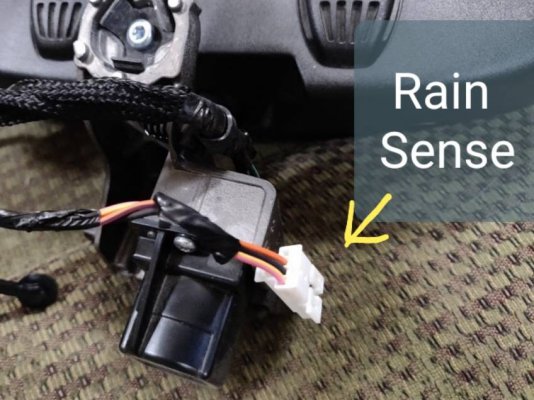
The difference in the new harness should be the extra 4pin connector near the mirror connector for the rain sensor (Auto wipers). Got pictures?
(What's the PN on your current factory 17 2500 harness & original mirror/features.)
68309105AA - (2017 2500, uConnect, ATC, no cab lights) only it has SmartBeam and rain sense wipers.
FYI: main difference between 13-16 and 17-18 (19 classic) mirror harness is that they removed the extra 4 wires for the 2 mics (moved the wires to driver side connector going up to the headliner)
Edit: added picture of the rain sensor connector...
M² Mods.
Last edited:
Canadian Mopar
Senior Member
- Joined
- Mar 18, 2018
- Posts
- 109
- Reaction score
- 51
- Location
- Alberta
- Ram Year
- 2017 2500 SLT
- Engine
- 6.4L HEMI
The difference in the new harness should be the extra 4pin connector near the mirror connector for the rain sensor (Auto wipers). Got pictures?
(What's the PN on your current factory 17 2500 harness & original mirror/features.)
68309105AA - (2017 2500, uConnect, ATC, no cab lights) only it has SmartBeam and rain sense wipers.
FYI: main difference between 13-16 and 17-18 (19 classic) mirror harness is that they removed the extra 4 wires for the 2 mics (moved the wires to driver side connector going up to the headliner)
Edit: added picture of the rain sensor connector...
M² Mods.
I didn't end up ordering the harness in case it was the same connector, or I didn't find a mirror. My original mirror just had the auto-dim, no uConnect, no SmartBeam. My truck doesn't have auto-wipers or cab lights either.
I'll check the P/N on my harness tonight, it's behind the dash on the passenger side correct?
OP
OP
- Joined
- Mar 30, 2014
- Posts
- 6,589
- Reaction score
- 5,202
- Location
- SC
- Ram Year
- 2022 Ram 1500 (5th Gen)
- Engine
- 5.7L
My original mirror just had the auto-dim, no uConnect, no SmartBeam. My truck doesn't have auto-wipers or cab lights either.
I'll check the P/N on my harness tonight, it's behind the dash on the passenger side correct?
That's correct.
M² Mods.
Austen
Senior Member
My local dealer added cab lights to my truck last year so I'm not sure since they were not installed from the factory if I would need a harness for a truck with cab lights or without. 17' Tradesman I'm wanting to add the auto dimming rear view mirror with smart beam/auto high beam. Can I get one without the 911/Assist buttons on it? Because I believe that won't work in my truck since my UAQ was not factory and I had a RA2 factory. What other options other than auto high beam, auto dimming mirror, and rain sense are there for the rear view? I'm sorry I'm sure these have been answered but I have been searching on this thread but I have seen someone before people saying to be careful because a lot of different sellers don't list the description correctly for these mirrors. Being my truck is a 17' would it be plug and play or will I need additional harnesses? I seen someone with a 18 and another gentleman with a 17 Ram swapped their mirrors and they didn't require an additional harness but, I did not know if their trucks being a higher trim model would make a difference or not.
17' CCSB 4X4 68RFE 2500 6.7 Tradesman DRP EGR delete, CTT tuning w/TCM tuning, UAQ w/7 speed HVAC, 7" premium EVIC, OEM front Parksense, OEM style front camera, aux switches, OEM remote start
17' CCSB 4X4 68RFE 2500 6.7 Tradesman DRP EGR delete, CTT tuning w/TCM tuning, UAQ w/7 speed HVAC, 7" premium EVIC, OEM front Parksense, OEM style front camera, aux switches, OEM remote start
Earl Zeis
Member
Anyone confirm the correct harness for a 2018 3500 without factory cab marker lights for auto dimming mirror without smartbeam? I see lots of 1500 stuff and years with question marks. The one listed for 17 2500/3500 comes up online without auto dimming mirror. So that's definitely not right. I checked my passenger side dash end cap and I have no harness running up to the headliner, open connector. So I definitely need a harness.
Thanks,
Earl
Thanks,
Earl
OP
OP
- Joined
- Mar 30, 2014
- Posts
- 6,589
- Reaction score
- 5,202
- Location
- SC
- Ram Year
- 2022 Ram 1500 (5th Gen)
- Engine
- 5.7L
Anyone confirm the correct harness for a 2018 3500 without factory cab marker lights for auto dimming mirror without smartbeam? I see lots of 1500 stuff and years with question marks. The one listed for 17 2500/3500 comes up online without auto dimming mirror. So that's definitely not right. I checked my passenger side dash end cap and I have no harness running up to the headliner, open connector. So I definitely need a harness.
Thanks,
Earl
The connector is the same for all the upgraded AutoDim Mirrors with/without SmartBeam (except with camera display in mirror). If there was one from a 17 without can lights I'd say use that one.
Your best bet is to find the vin of a 2017/18 2500/3500 truck without cab lights but with AutoDim Mirror (and/or with SmartBeam and/or rain sense wipers) and contact forum vendor AllMoparParts (Benny) to have him look up the PN.
Let me know what you find and I will update the thread.
M² Mods.
tzr916
Senior Member
- Joined
- Oct 2, 2018
- Posts
- 155
- Reaction score
- 78
- Location
- Stockton, CA
- Ram Year
- 14 QC SLT 6'4"
- Engine
- 5.7L 8spd 2WD
I have a stupid question... I added chrome cap "limited" power fold, tilt reverse, turn signal, dimming side mirrors (non-tow) to my 2014 SLT that originally had regular mirrors and RA2 radio and (manual flip to dim) rear view mirror. I set all the necessary AlfaOBD codes, everything works but not sure if the side mirrors are dimming or not? Do they automatically dim (based on what?), or dim when I manually flip my rear view, or dim from the radio screen?
On another note... I added an aftermarket radio with iDatalink, but I see no way to use the microphones built into my rear view mirror. I searched but seems there's no such adapter. Do the rear view mirror microphone wires go all the way to the RA2 radio harness? What pins? Can I create my own adapter?
Thanks!
On another note... I added an aftermarket radio with iDatalink, but I see no way to use the microphones built into my rear view mirror. I searched but seems there's no such adapter. Do the rear view mirror microphone wires go all the way to the RA2 radio harness? What pins? Can I create my own adapter?
Thanks!
Last edited:
chrisbh17
Senior Member
- Joined
- Oct 12, 2017
- Posts
- 6,720
- Reaction score
- 7,527
- Ram Year
- 2017
- Engine
- Hemi 5.7
I have a stupid question... I added chrome cap "limited" power fold, tilt reverse, turn signal, dimming side mirrors (non-tow) to my 2014 SLT that originally had regular mirrors and RA2 radio and (manual flip to dim) rear view mirror. I set all the necessary AlfaOBD codes, everything works but not sure if the side mirrors are dimming or not? Do they automatically dim (based on what?), or dim when I manually flip my rear view, or dim from the radio screen?
On another note... I added an aftermarket radio with iDatalink, but I see no way to use the microphones built into my rear view mirror. I searched but seems there's no such adapter. Do the rear view mirror microphone wires go all the way to the RA2 radio harness? What pins? Can I create my own adapter?
Thanks!
I believe the mirrors dim based on input from the rear view mirror. I dont think the manual flip rear view mirror has the necessary sensor for detecting light levels. I think you need the auto-dim rear view mirror for that.
OP
OP
- Joined
- Mar 30, 2014
- Posts
- 6,589
- Reaction score
- 5,202
- Location
- SC
- Ram Year
- 2022 Ram 1500 (5th Gen)
- Engine
- 5.7L
^^^^ what Chrisbh17 said.
Yes the mics go all the way to the back of the radio connector.
Go here and look for radio C1 connector...
http://connectors.dcctools.com/home.htm
M² Mods.
Yes the mics go all the way to the back of the radio connector.
Go here and look for radio C1 connector...
http://connectors.dcctools.com/home.htm
M² Mods.
Similar threads

- Replies
- 3
- Views
- 2K


- Replies
- 233
- Views
- 114K


Members online
Total: 1,905 (members: 10, guests: 1,895)
Robots: 1,200
Robots: 1,200