Hood Latch Assy for the Remote Start Kit wiring question ...

Disclaimer: Links on this page pointing to Amazon, eBay and other sites may include affiliate code. If you click them and make a purchase, we may earn a small commission.

oldguy2

Senior Member
Joined
Sep 8, 2018
Posts
111
Reaction score
47
Location
NH
Ram Year
2017
Engine
5.7
I don't have the software yet. I'm not good with computers so I'm going to have my son help me with it. He is an IT tech and into cars too. I'll check on the connector as soon as I can. If I can't tomorrow (Monday) it may be a week because I have to work out doors and it is supposed to rain/snow for 2-3 days and then I have to go to San Diego for 4 days. Please don't think I'm ignoring you because I am very interested. Thanks for everything.
 

oldguy2

Senior Member
Joined
Sep 8, 2018
Posts
111
Reaction score
47
Location
NH
Ram Year
2017
Engine
5.7
My grandson got the plug to PIN 11 disconnected and we looked in the plug at the terminal that goes over pin 11 and there was a metal connector in it. Because of the way the plug is constructed we couldn't tell which wire went to that terminal but there were 2 purple wires near it and one appeared to be Purple/Blue tracer. Does that mean there is a location where we can access the other end of that wire. Getting to the plug on the BCM is very difficult.
 

Jimmy07

Senior Member
Joined
Feb 23, 2017
Posts
3,512
Reaction score
3,565
Ram Year
2017
Engine
6.4 Hemi
My grandson got the plug to PIN 11 disconnected and we looked in the plug at the terminal that goes over pin 11 and there was a metal connector in it. Because of the way the plug is constructed we couldn't tell which wire went to that terminal but there were 2 purple wires near it and one appeared to be Purple/Blue tracer. Does that mean there is a location where we can access the other end of that wire. Getting to the plug on the BCM is very difficult.
Yes. The purple with blue tracer is the wire. The other end of that wire is in the big connector underneath the fuse box in the engine bay. Post 1 in this thread has a really good pic of the connector and how to lift the fuse box to access it https://www.ramforum.com/threads/how-to-add-remote-start-to-2017-ram.99849/

That wire will be in the connector that the one in the picture mates to (the one with male pins). If you have a 1500 it will be in position 5. If you have a 2500 it will be in position 1. All you have to do is de-pin that wire from the connector and ground it with a 1k ohm resistor. Once you get the alfa, you can enable the remote start.
 

oldguy2

Senior Member
Joined
Sep 8, 2018
Posts
111
Reaction score
47
Location
NH
Ram Year
2017
Engine
5.7
It will be a little while before I can get the ALFA and the OBD piece but I want to thank everyone who answered. It will be probably be a couple of weeks before I have everything I need to try this. I will post with results or with questions. Many thanks again.
 
OP
OP
Cillys

Cillys

Senior Member
Joined
Dec 30, 2018
Posts
171
Reaction score
52
Location
Virginia
Ram Year
2017
Engine
6.7
To everyone that's commented ... thank you ... lots of good information that I was unaware of and all ... this community is awesome
 
  • Like
Reactions: kad

oldguy2

Senior Member
Joined
Sep 8, 2018
Posts
111
Reaction score
47
Location
NH
Ram Year
2017
Engine
5.7
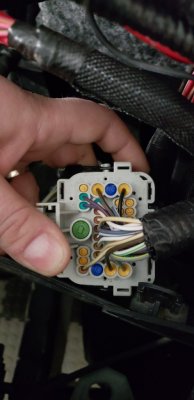
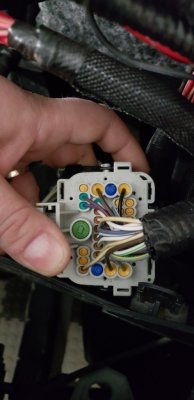
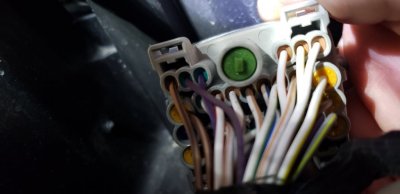
Hi its me again. I have everything I need now. My son and I found the connector under the Fuse box but before I do something wrong, do understand correctly that I am to remove the Number 5 wire from the connector and ground that wire through a 1K ohm resistor? What happens to the wire on the other side of the connector that it connects to? Also where do I find the settings that have to be changed? Sorry about all my confusion.

connector 1.jpg

connector 2.jpg

connector 1.jpg

connector 2.jpg
 
OP
OP
Cillys

Cillys

Senior Member
Joined
Dec 30, 2018
Posts
171
Reaction score
52
Location
Virginia
Ram Year
2017
Engine
6.7
Hi its me again. I have everything I need now. My son and I found the connector under the Fuse box but before I do something wrong, do understand correctly that I am to remove the Number 5 wire from the connector and ground that wire through a 1K ohm resistor? What happens to the wire on the other side of the connector that it connects to? Also where do I find the settings that have to be changed? Sorry about all my confusion.

View attachment 153367

View attachment 153368

View attachment 153369

View attachment 153370

It looks to me you already have everything. Are you a 1500 or 2500/3500?

Look all around the under your hood by the hood latch and see if you already don't have the loose connector secured under there.


Sent from my iPhone using Tapatalk
 

Jimmy07

Senior Member
Joined
Feb 23, 2017
Posts
3,512
Reaction score
3,565
Ram Year
2017
Engine
6.4 Hemi
Hi its me again. I have everything I need now. My son and I found the connector under the Fuse box but before I do something wrong, do understand correctly that I am to remove the Number 5 wire from the connector and ground that wire through a 1K ohm resistor? What happens to the wire on the other side of the connector that it connects to? Also where do I find the settings that have to be changed? Sorry about all my confusion.

View attachment 153367

View attachment 153368

View attachment 153369

View attachment 153370
From your pics, we can now see that your truck is fully wired from the BCM all the way to the two wire connector that plugs into the hood latch with the hood ajar sensor (68159725AB). If you wanted it to operate just like factory, that’s all you would need to buy. If you don’t want to buy the latch, and just want to use the resistor, you can do that too. Put your fuse box back together and start looking for the 2 wire connector up by the radiator that would plug into the latch. I would just take the resistor and jump it between the two terminals, secure it, and put some heat shrink over it, so you always have the option to add the hood latch.

After that, connect the alfa to your BCM by selecting your truck, then body computer, then MY2016-2017 for control unit. Next page click connect, then click the little car with the hood open on the bottom right. Click the select procedure to start drop down menu and scroll all the way to the bottom and select car configuration change. Drop down the select option menu and change these settings:

Remote start present- yes

CBC I/O hood ajar switch input present- yes

CBC I/O usage hood ajar switch usage- 1k parallel resistor

Back out of those screens to where you select your truck. Select Radio frequency hub, then MY2013-2017 PowerNet. Next screen, connect then click car with hood open. Drop down select procedure to start and select RF Hub reset/replace. Enter your PIN and click start. After procedure complete, back out of the app, turn ignition off, remove fob, and exit truck close doors. Let truck sit for a bit, then try remote starting.

 
OP
OP
Cillys

Cillys

Senior Member
Joined
Dec 30, 2018
Posts
171
Reaction score
52
Location
Virginia
Ram Year
2017
Engine
6.7
Hi its me again. I have everything I need now. My son and I found the connector under the Fuse box but before I do something wrong, do understand correctly that I am to remove the Number 5 wire from the connector and ground that wire through a 1K ohm resistor? What happens to the wire on the other side of the connector that it connects to? Also where do I find the settings that have to be changed? Sorry about all my confusion.

View attachment 153367

View attachment 153368

View attachment 153369

View attachment 153370

I still like to know how you got to the connector underneath the dash so easily.

Could you take wider angle pics too please. Like too see the whole thing. I still gotta look for mine too. Lol


Sent from my iPhone using Tapatalk
 

oldguy2

Senior Member
Joined
Sep 8, 2018
Posts
111
Reaction score
47
Location
NH
Ram Year
2017
Engine
5.7
That connector is NOT under the dash. It is under the fuse box next to the battery. I don't have a PIN. Where do I get it?
 

ramrocker

Senior Member
Joined
Oct 22, 2017
Posts
193
Reaction score
111
Location
Pearland, TX
Ram Year
2017
Engine
6.7L CTD
That connector is NOT under the dash. It is under the fuse box next to the battery. I don't have a PIN. Where do I get it?

Dealer Parts dept. Ask for for your truck's PIN.
Show drivers license and proof of ownership.
The PIN is a 4 digit number.

The printout may look like:
Key Code Inquiry Results
VIN:3C6JR***********
Ignition:M****
PIN:****
 
Last edited:

Jimmy07

Senior Member
Joined
Feb 23, 2017
Posts
3,512
Reaction score
3,565
Ram Year
2017
Engine
6.4 Hemi
That connector is NOT under the dash. It is under the fuse box next to the battery. I don't have a PIN. Where do I get it?
You won’t be looking for it under the dash. It is in the front of the engine compartment in the radiator area somewhere by the hood latch. That is where these to wires go XycQOBS.jpg so it’s there somewhere.
 

Jimmy07

Senior Member
Joined
Feb 23, 2017
Posts
3,512
Reaction score
3,565
Ram Year
2017
Engine
6.4 Hemi
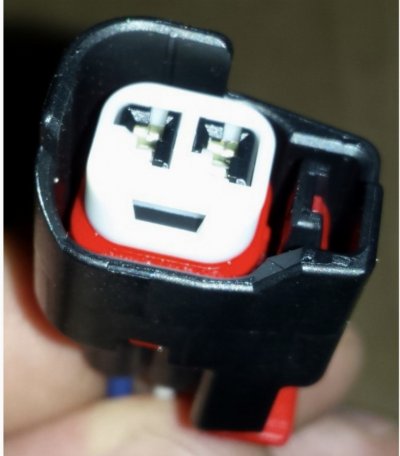
This is the end of the connector you’re looking for LHmF9ql.jpg
Jump those two terminals with the resistor.
 

Jimmy07

Senior Member
Joined
Feb 23, 2017
Posts
3,512
Reaction score
3,565
Ram Year
2017
Engine
6.4 Hemi
I’ll clarify a little more. You first confirmed that you had the wire in pin 11 on your BCM, but didn’t want to ground it there because it was too tight. Then we were going to have you ground it from where it goes into the connector under the fuse box. That connector is just a common junction of the wires from the bcm to where they start branching off to their various items.

This half of the connector that you’re holding contains all of the wires that originate at the bcm. The arrow is pointing at the hood ajar sense that originates at pin 11 HwYxbKY.jpg

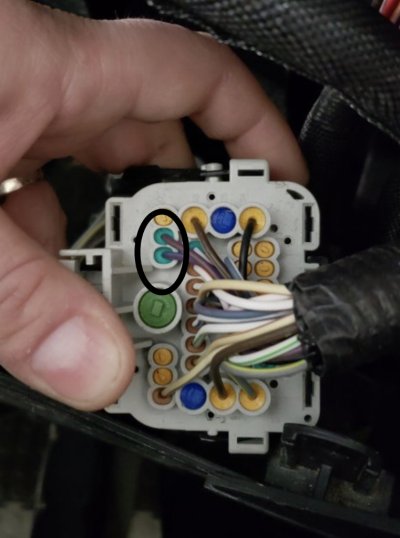
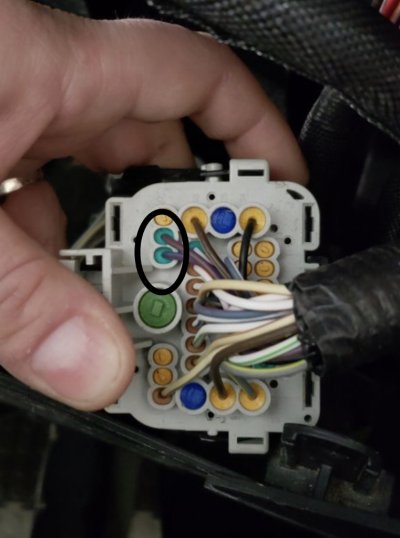
The picture below, you’re holding the half of the connector that all those wires continue on, branching off to the headlights, fogs, washer level and wipers, etc. Thanks to your pictures of both halves, we can see that the circled wires indicate that the hood latch connector is present, and the easiest option is to jump the terminals on the end of that connector

XycQOBS.jpg
 

oldguy2

Senior Member
Joined
Sep 8, 2018
Posts
111
Reaction score
47
Location
NH
Ram Year
2017
Engine
5.7
Thanks alot. I'll do that right away
 

oldguy2

Senior Member
Joined
Sep 8, 2018
Posts
111
Reaction score
47
Location
NH
Ram Year
2017
Engine
5.7
Instead of using the 1K resister I spent the $33 and bought the hood latch seeing that the harness connector was right there. In your directions you told me to change the "CBC I/O usage hood ajar switch usage - 1K par. resister". Since I am using the switch do I set it to the same thing or something else? I'm slow but I'm getting there. I also bought a new FOB case to use the key pad. It was only $8. Thanks again.
 

Jimmy07

Senior Member
Joined
Feb 23, 2017
Posts
3,512
Reaction score
3,565
Ram Year
2017
Engine
6.4 Hemi
Instead of using the 1K resister I spent the $33 and bought the hood latch seeing that the harness connector was right there. In your directions you told me to change the "CBC I/O usage hood ajar switch usage - 1K par. resister". Since I am using the switch do I set it to the same thing or something else? I'm slow but I'm getting there. I also bought a new FOB case to use the key pad. It was only $8. Thanks again.
Set it the same...1k.
 

oldguy2

Senior Member
Joined
Sep 8, 2018
Posts
111
Reaction score
47
Location
NH
Ram Year
2017
Engine
5.7
Thanks. Like I said I'm slow but persistent.
 

oldguy2

Senior Member
Joined
Sep 8, 2018
Posts
111
Reaction score
47
Location
NH
Ram Year
2017
Engine
5.7
It's finally done and it works. At first all it would do was lock the doors, flash the lights and blow the horn. Everything but start the truck. After I drove it everything worked. I want to thank everyone on here. I was slow but with all your help I did it. Many thanks!!!!
 

1500ram12

Senior Member
Joined
Jan 23, 2012
Posts
5,487
Reaction score
2,432
Ram Year
2005
Engine
5.9L Cummins
It's finally done and it works. At first all it would do was lock the doors, flash the lights and blow the horn. Everything but start the truck. After I drove it everything worked. I want to thank everyone on here. I was slow but with all your help I did it. Many thanks!!!!

I just went through the same thing this weekend. Went for a drive today and checked again when I get home and it worked. Spent a couple hours trouble shooting with @Jimmy07. Big thanks to him for taking time to help out


Sent from my iPhone using Tapatalk Pro
 
Back
Top