How To: Install a 2018 4C (UAQ/UAS) Radio in 2013 - 2017 RAM

Disclaimer: Links on this page pointing to Amazon, eBay and other sites may include affiliate code. If you click them and make a purchase, we may earn a small commission.

Jhuss96

Senior Member
Joined
Apr 17, 2019
Posts
199
Reaction score
140
Location
Northeast US
Ram Year
2016
Engine
5.7 Hemi
The UAQ looks right, I don't know about that UAS part number though. Generally, I stay away from AA part numbers on complex parts.

Sent from my HTC U11 using Tapatalk

Awesome thanks for the heads up. It's hard to keep track of all the different model numbers and which ones are and are not worth getting. I'll probably end up going with the UAQ.
 

Mpgrimm2

Senior Member
Supporting Vendor Navy Badge
Joined
Mar 30, 2014
Posts
6,588
Reaction score
5,202
Location
SC
Ram Year
2022 Ram 1500 (5th Gen)
Engine
5.7L
Hey all,

I have a quick question for the experts in here, I'm pretty confused with how all the model numbers work with changes made since 2018. I've been eyeing a UAS model number: 68332807aa or a UAQ model number: 68331631AK

Are both of those model numbers workable for this mod? The numbers have changed a bit since the original post in 2018 so I want to be sure I'll be good as long as I steer clear of the Delphie 5th gen radios.
These are verified 4th Gen Ram UAQ or UAS radio PNs & some Canadian UCQ / UCS units ... There may be other Ram 2018/19-21 classic PNs, but unless it is known/verified to come out of a 4th Gen Ram & backed up by a verified Ram VIN/Build sheet, you're likely taking a crap shoot on getting a fully compatible radio.

The OP could use some updates, but I don't have control of that currently.

---------------------
2018/19 classic 4th Gen Ram Radio: (USA)
68331631Ax (UAQ 4c Nav)
or 68331635Ax (UAS 4c non-nav)


2020 classic 4th Gen Ram Radio: (USA)

68461703AB (UAS 4c non-nav)


---------------------
2018/19 classic 4th Gen Ram Radio: (Canadian)
68331632Ax (UCQ 4c Nav)

2019/2020 classic 4th Gen Ram Radio: (Canadian)
68340153Ax (UCS 4c non-nav)
---------------------


& Yes, some xxxxxxAA part numbers are engineering only test units that you will never get to work correctly.

M² Mods.
 

jlh0324

Junior Member
Joined
Jul 14, 2018
Posts
8
Reaction score
9
Location
Sullivan City, Tx
Ram Year
2017
Engine
Cummins 6.7
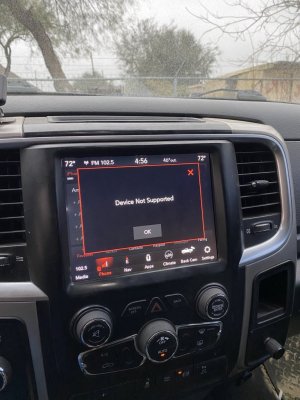
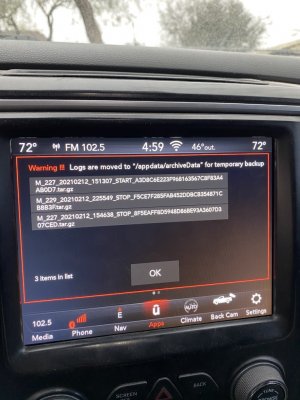
2D30FBF7-7DEE-480F-B1DA-F0898F09E0B3.jpeg AC690C1A-8885-449B-81B3-0216905F30EC.jpeg Would anyone know why I’m getting the device not supported screen on every start up? Once I plug in my phone, CarPlay functions perfectly and continues to until I let the truck sleep for a couple of minutes. The other warning screen has come up a couple of times since I installed this radio a couple months ago, I don’t know the exact cause of it or what it means, but it usually comes up if I pull the fuse or restart the radio ECM with alphaOBD. My truck is 2017 and I got this radio at a steal locally and it came with the single usb and aux hub that worked fine but had the error screen. I updated to the 200C dual usb and aux hub to see if it would fix the issue, but it’s still there. My UAQ is part # 68331631AK. Any ideas?

I also don’t have the Sirius XM button anywhere on this radio. Is it supposed to be there or do you have to have a subscription for it to show up?
 

PdPuNOme

Senior Member
Joined
May 6, 2012
Posts
314
Reaction score
167
Location
Jersey
Ram Year
2022
Engine
5.7
thanks, still no app icons, i do have in them in the controls but no where else. all other settings are correct. ill give it another day and see what happens, since the only setting I had to change was the trailer hitch one (all others were already set correctly). Once I did the trailer hitch I then went from one cam button in controls to two separate, so had progress but not what i am ultimately after. I know about the timeout or mph restriction for the backup cam and cargo cams. From what I have gathered over the years only way to have on demand for as long as you want whenever you want is going with an aftermarket harness setup, but I like it stock unless I decide to go with the factory grille cam from a limited (hard to find).


Well, update on my case, still no apps. There is something odd with mine clearly so will continue digging. All settings are correct, just no app icons outside of the controls screen.
 

crash68

ACME product engineer
Staff member
Administrator Moderator Supporting Member
Joined
Mar 20, 2016
Posts
12,371
Reaction score
21,559
Ram Year
2015
Engine
3.0 EcoDiesel
My truck is 2017 and I got this radio at a steal locally and it came with the single usb and aux hub that worked fine but had the error screen. I updated to the 200C dual usb and aux hub to see if it would fix the issue, but it’s still there. My UAQ is part # 68331631AK. Any ideas?

I also don’t have the Sirius XM button anywhere on this radio. Is it supposed to be there or do you have to have a subscription for it to show up?
Sirius should show up whether you have a subscription or not.
Have you tried doing a factory reset on the radio?
You could try updating the firmware to the latest supported which I think is 22.8?? although there are higher revisions(there's a thread on this forum). As with any firmware update it could fix the problem but there is always the chance it could make it worse.
 

CoZo6

2021 Limited Longhorn 1500
Joined
Feb 25, 2018
Posts
131
Reaction score
82
Location
Douglas County, Colorado
Ram Year
2021
Engine
5.7 eTorque
My UAQ is part # 68331631AK. Any ideas?

I also don’t have the Sirius XM button anywhere on this radio. Is it supposed to be there or do you have to have a subscription for it to show up?[/QUOTE]

My UAQ is 68331631AJ in my 2017 2500. Your part number should work just fine. My firmware is 22.6, and all functions run perfectly since installation some time ago.
As mentioned, Sirius XM button should pop up when your radio is all in good order.
 

SitKneelBend

Moderator
Staff member
Member Relations Specialist
Moderator Supporting Member Marine Corps
Joined
Jan 8, 2015
Posts
11,003
Reaction score
7,717
Location
St. Louis
Ram Year
2014
Engine
3.6 Pentastar
View attachment 237428 View attachment 237429 Would anyone know why I’m getting the device not supported screen on every start up? Once I plug in my phone, CarPlay functions perfectly and continues to until I let the truck sleep for a couple of minutes. The other warning screen has come up a couple of times since I installed this radio a couple months ago, I don’t know the exact cause of it or what it means, but it usually comes up if I pull the fuse or restart the radio ECM with alphaOBD. My truck is 2017 and I got this radio at a steal locally and it came with the single usb and aux hub that worked fine but had the error screen. I updated to the 200C dual usb and aux hub to see if it would fix the issue, but it’s still there. My UAQ is part # 68331631AK. Any ideas?

I also don’t have the Sirius XM button anywhere on this radio. Is it supposed to be there or do you have to have a subscription for it to show up?
My UAQ is part # 68331631AK. Any ideas?

I also don’t have the Sirius XM button anywhere on this radio. Is it supposed to be there or do you have to have a subscription for it to show up?

My UAQ is 68331631AJ in my 2017 2500. Your part number should work just fine. My firmware is 22.6, and all functions run perfectly since installation some time ago.
As mentioned, Sirius XM button should pop up when your radio is all in good order.[/QUOTE]

SXM will disappear if disconnected from power and will reappear with several power cycles/hours.

Sent from my HTC U11 using Tapatalk
 
Last edited:

Abnsapper

Junior Member
Joined
Jun 10, 2020
Posts
17
Reaction score
11
Location
South Carolina
Ram Year
2012, 2015, 2018
Engine
345
I have a quick question. I am stumped! I have a 2018 Ram Express. I changed out the entire dash loom with a 2018 ram Laramie loom and I added an OEM amp from a 2017. I have two problems: The 8.4 radio (from a 2015 ram) has a blank screen (no sound, no color, nothing) The back up camera will not pull-up. My heater works but the A/C will not. The heater controls will not light-up (or anything else) in the radio screen, almost as though there is absolutely no power going to the radio. I checked fuse under hood (F71 -amp) and there is a wire running (red) I thought it might be the Hvac control module, so I changed that to 68366552AA, still no radio. So, I started to think that perhaps the only a 2018 radio will work in a 2018 truck that already had the correct wiring. Or, I am missing a power problem somewhere. I know this is out of the ordinary, usually it is putting a earlier model 8.4 in a newer truck. Just wondering if anyone might have a plausible answer. Also, I did notice that there is an Hvac control module that cost around $400 (68268186AA). I sure hope this is not the issue. For $400 that is highway robbery. Anyway, any help will be greatly appreciated.


68268186AA
 

crash68

ACME product engineer
Staff member
Administrator Moderator Supporting Member
Joined
Mar 20, 2016
Posts
12,371
Reaction score
21,559
Ram Year
2015
Engine
3.0 EcoDiesel
@Abnsapper
Did you check the fuse for the radio thats by the brake booster? I have a 2018 radio in my '15
Your power problems are probably due the wiring harness you changed, without checking to make sure the wiring will match it's possible wires don't line up at the plugs or you have bad connections in them.
 

Abnsapper

Junior Member
Joined
Jun 10, 2020
Posts
17
Reaction score
11
Location
South Carolina
Ram Year
2012, 2015, 2018
Engine
345
I s it an inline single fuse? If so, not I have not. I appreciate the heads-up. I also thought the same about the wiring. All of the in-cab wiring (for the most part) is the same. The new harness has the leads for the ambient lighting and lead for the center dash speaker and amp connections. Aside from this, everything else matched up perfectly. I suppose certain pigtail may have extra wiring (I would guess that some do) however, I have no idea why I am not getting any power to the radio. The fuse seems the most likely candidate. Unless, power for the radio is now provided through the amp. I thought for certain that the radio power would have been in the fuse box. Im going to see if the fuse has blown. Thanks.
 

Abnsapper

Junior Member
Joined
Jun 10, 2020
Posts
17
Reaction score
11
Location
South Carolina
Ram Year
2012, 2015, 2018
Engine
345
Just checked the fuse (20a) in-line fuse. Not blown. I'm thinking it must have something to do with radio compatibility or Hvac control module. The absence of any power to the radio is what has me stumped. Im just wondering if 2018 Rams that were standard with the 8.4s will not accept older model 8.4s.
 

Mpgrimm2

Senior Member
Supporting Vendor Navy Badge
Joined
Mar 30, 2014
Posts
6,588
Reaction score
5,202
Location
SC
Ram Year
2022 Ram 1500 (5th Gen)
Engine
5.7L
I have a quick question. I am stumped! I have a 2018 Ram Express. I changed out the entire dash loom with a 2018 ram Laramie loom and I added an OEM amp from a 2017. I have two problems: The 8.4 radio (from a 2015 ram) has a blank screen (no sound, no color, nothing) The back up camera will not pull-up. My heater works but the A/C will not. The heater controls will not light-up (or anything else) in the radio screen, almost as though there is absolutely no power going to the radio. I checked fuse under hood (F71 -amp) and there is a wire running (red) I thought it might be the Hvac control module, so I changed that to 68366552AA, still no radio. So, I started to think that perhaps the only a 2018 radio will work in a 2018 truck that already had the correct wiring. Or, I am missing a power problem somewhere. I know this is out of the ordinary, usually it is putting a earlier model 8.4 in a newer truck. Just wondering if anyone might have a plausible answer. Also, I did notice that there is an Hvac control module that cost around $400 (68268186AA). I sure hope this is not the issue. For $400 that is highway robbery. Anyway, any help will be greatly appreciated.


68268186AA
You can't just use the dash harness from a parts truck in many cases as-is for an 8.4 upgrade. Too many variations in wiring and signals between 13-18 years, between 1500/2500, & trim levels (Blame the engineers). Just because a harness section plugs in doesn't mean it had the same signals on all of the same pins ie that the signals make it all the way back to where they need to go at the next harness. It's a exercise in futility in most cases.

Edit:
I have had 3 or 4 people ask me about trying this in a private message over the last 2 weeks. Sure it can be done, if you compare connector to connector and pin to pin between each truck and it's schematics to figure it out. There are too many examples of FCA moving signals/pins around between pins in the same connector or even different connectors to list on the 13-18/classic trucks. (Foglights = same connector/different pins on 1500 vs 2500 for one)

M² Mods.
 
Last edited:

TriadGuy

Junior Member
Joined
Aug 9, 2018
Posts
8
Reaction score
1
Location
Thomasville NC
Ram Year
2016
Engine
Cummins 6.7
View attachment 237428 View attachment 237429 Would anyone know why I’m getting the device not supported screen on every start up? Once I plug in my phone, CarPlay functions perfectly and continues to until I let the truck sleep for a couple of minutes. The other warning screen has come up a couple of times since I installed this radio a couple months ago, I don’t know the exact cause of it or what it means, but it usually comes up if I pull the fuse or restart the radio ECM with alphaOBD. My truck is 2017 and I got this radio at a steal locally and it came with the single usb and aux hub that worked fine but had the error screen. I updated to the 200C dual usb and aux hub to see if it would fix the issue, but it’s still there. My UAQ is part # 68331631AK. Any ideas?

I also don’t have the Sirius XM button anywhere on this radio. Is it supposed to be there or do you have to have a subscription for it to show up?


I have this EXACT SAME ISSUE!!!

NO fix for 6 months!!
 

TriadGuy

Junior Member
Joined
Aug 9, 2018
Posts
8
Reaction score
1
Location
Thomasville NC
Ram Year
2016
Engine
Cummins 6.7
Sirius should show up whether you have a subscription or not.
Have you tried doing a factory reset on the radio?
You could try updating the firmware to the latest supported which I think is 22.8?? although there are higher revisions(there's a thread on this forum). As with any firmware update it could fix the problem but there is always the chance it could make it worse.


NOTHING has been able to fix this issue for me.

I can "test" the XM in AlphaOBD...its still there....Just NO interface anywhere. Sub even still shows active
 

65aircooled

Junior Member
Joined
Sep 25, 2014
Posts
6
Reaction score
4
Ram Year
2014
Engine
Cummins 6.7
I have a question for the savvy :)
Yesterday I installed a UAS unit in my 2014 Ram 3500 Laramie CTD 6 speed manual, to replace the original 8.4AN that came with the truck, mostly for iPhone integration.
I figured, for $300 it was worth the shot.
At first there was A LOT of stuff missing such as main settings where the safety settings, trailer brake controller etc is. The same for the heated/vented seats soft buttons and Sirius button.

As of this morning, I got the Sirius button back, the heated seats button, although grayed and non functioning which I knew was going to be, based on what I’ve read on this thread; and the rest of the settings came back.

I can live with the soft buttons for the seats, I mean, I may have used them 5 times in the past 7 years... so no list love there.
The real issue I have is the back up camera.
There is a functioning soft button for it, but the camera doesn’t come on when I put the truck in reverse. I have to manually turn it on with the back up camera button on the radio and then turn it off manually. When I turn it on, the top of the screen says “Back up camera not available” although it does work, but again, not when the truck is in reverse.

I spent hrs yesterday reading thru the whole thread and didn’t see anything like that.
I understand my truck being a 6 speed manual is not common, and that may have something to do with this.

Any thoughts on this?
I just ordered the hub today and the pigtail for it from the vendor here, so I probably won’t have them installed for a few days, but it’s hard to imagine the hub would have anything to do with reverse cam?

Thanks in advance!

 

Mpgrimm2

Senior Member
Supporting Vendor Navy Badge
Joined
Mar 30, 2014
Posts
6,588
Reaction score
5,202
Location
SC
Ram Year
2022 Ram 1500 (5th Gen)
Engine
5.7L
Backup cam won't come on automatically in reverse with the UAQ/UAS upgrade on a manual truck. search the thread above for posts by @Austen and @ManualCummins, @Errol Smith and a handful of others I can't recall. I believe @Roman217 is helping them with a home brew CANbus interface module as a workaround.

On screen heated seats/wheel controls not working with a UAQ or UAS upgrade is a known issue on 2013-14/some 2015 trucks. The fix for most is a ' 4c Seat Interface Module' from Infotainment. The 'Enzo' / 'Enigma' interface module from CustomTronix also says it supports the seats with the UAQ or UAS Upgrade. There has also been some reports of awaiting out the 13-15 heated Seat Module under the driver seat for the newer 2017 PN, but that hasn't worked for everyone either.

M² Mods.
 
Last edited:

Jhuss96

Senior Member
Joined
Apr 17, 2019
Posts
199
Reaction score
140
Location
Northeast US
Ram Year
2016
Engine
5.7 Hemi
Hi all,

I finally got my UAQ in the truck and working. I have all icons and everything is working properly except carplay.

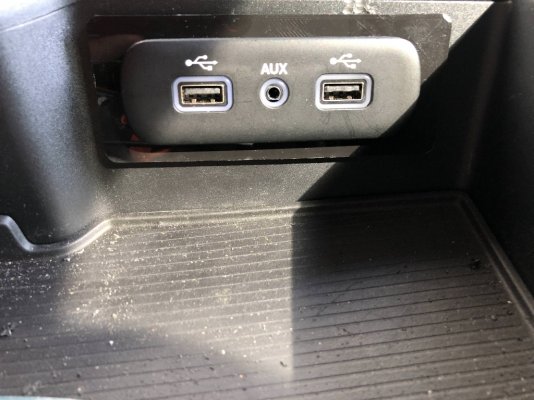
I have a chrysler 300 media hub part #68283703AA plugged it in with the conversion harness and used an apple lightning connector, the radio did not recognize any phone connected in either USB slot. I disconnected and reconnected fully to ensure it wasnt a fluke and it again wouldnt recognize any usb input.

Has anyone run into this? Would love any assistance that can be offered
 

SitKneelBend

Moderator
Staff member
Member Relations Specialist
Moderator Supporting Member Marine Corps
Joined
Jan 8, 2015
Posts
11,003
Reaction score
7,717
Location
St. Louis
Ram Year
2014
Engine
3.6 Pentastar
Hi all,

I finally got my UAQ in the truck and working. I have all icons and everything is working properly except carplay.

I have a chrysler 300 media hub part #68283703AA plugged it in with the conversion harness and used an apple lightning connector, the radio did not recognize any phone connected in either USB slot. I disconnected and reconnected fully to ensure it wasnt a fluke and it again wouldnt recognize any usb input.

Has anyone run into this? Would love any assistance that can be offered
Does the phone show its charging? Will a USB drive with music play? That would let you know that power and data are flowing.

If both above work, I would try a different cable and make sure smartphone projection is checked under the phone pairing options of the radio.

Sent from my HTC U11 using Tapatalk
 

Jhuss96

Senior Member
Joined
Apr 17, 2019
Posts
199
Reaction score
140
Location
Northeast US
Ram Year
2016
Engine
5.7 Hemi
Does the phone show its charging? Will a USB drive with music play? That would let you know that power and data are flowing.

If both above work, I would try a different cable and make sure smartphone projection is checked under the phone pairing options of the radio.

Sent from my HTC U11 using Tapatalk

Nope phone didn't show as charging, nor did it pick up the usb option on the radio. Just for fun, I plugged in my original 2016 ram usb hub without the adapter harness. The original one doesn't pick up the usb, which Im not sure is normal or not with the new radio, but it does pick up the aux input. I'm going to test with the Chrysler 300c hub on my next day off to see if it can pick up the aux input to verify if power is flowing to the hub.
 
Back
Top