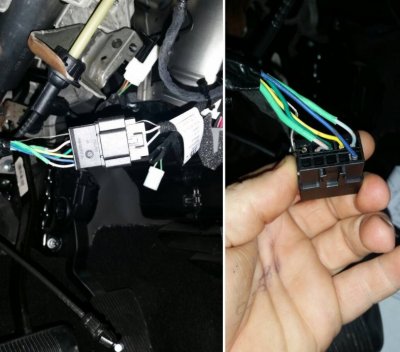
Ktstull said:
Alright so I did the update, still no lines and no option for any, so now I am going to assume the problem lies at the BCM, which of course I have no idea where that is or really what to even look for to find it....
You are going to want to take a look at the BCM C5/E connector pin 45 to see if there is a wire (orange wire) connected to activate the lines. Some trucks may already have had a wire there, so the installer is supposed to "splice" onto the wire with the one from the kit.
I recommend you read through the kit directions, reference the schematic and read the linked posts (linked below) before hunting around in there. Likely the dealer tech didn't connect the wire, or didn't connect it to the correct wire on the BCM (or possibly a bad splice). If you don't see something obvious, then consider having them fix... and don't let them tell you it's correct as-is because it is definitely not.
Be sure to post questions in the forum thread for the camera, there are several guys who can also help steer you in the right direction ( I go on vacation in 2 days). And don't forget to disconnect the battery before you go unplugging things.
From post 10 of the camera thread (Lots of great references in one spot ...
Here are the current Ram/Chrysler OEM kit directions (and P/N's) for adding the factory Parkview Camera to 2013-2015 Ram Trucks depending on your Trim Level/radio i.e. Express/RA1 vs rest/RA2,RA3,RA4.
-
PN 82214240 (RA2, RA3, RA4 Radios as monitor)
$300 parts/$507 installed at dealership
K6862043 2013-2015 Ram Parkview Cam w RA2 RA3 RA4 Radio Monitor PN 82214240
Here are both the basic factory Backup Camera schematic and the Add-On Kit schematic for the Radio/harness ...
2013+ Factory & OEM Add-On Kit PN 82214240 schematics.png
** Please DOUBLE CHECK & RECHECK YOUR WIRING at ALL CONNECTOR PINS BEFORE RE-APPLYING POWER! **
Post 19+ - Pictures of the BCM Module layout for the C5/E connector. Post 20 & up have some good pictures by 70chall440 also.







 )
)