Hemi395
Senior Member
- Joined
- Mar 18, 2013
- Posts
- 9,505
- Reaction score
- 17,672
- Location
- Cape Cod MA
- Ram Year
- 2013
- Engine
- 5.7 Hemi
Is there anyway to set the BCM using Alfa to recognize the 32 gallon tank?


Disclaimer: Links on this page pointing to Amazon, eBay and other sites may include affiliate code. If you click them and make a purchase, we may earn a small commission.
So here's a thought. With many people changing settings they shouldn't be and messing up some things in their truck (me included). Wouldn't it be nice to have the options to load all of your initial settings back onto your truck? For example, with the initial download of your "System Information", AlphaOBD should be able to save that somewhere. Then if you mess some settings up, you could simply install your truck specific settings back onto your truck, and start back at the beginning.
There are a few fuel tank 1&2 calibration settings but I am unaware of anyone who has used them. Proceed with caution.Is there anyway to set the BCM using Alfa to recognize the 32 gallon tank?
There are a few fuel tank 1&2 calibration settings but I am unaware of anyone who has used them. Proceed with caution.
Would be interesting to see a BCM dump from someone who has had the 32 gallon flash (that is actually working)
I dont know if Alfa can show the current values for those settings without attempting to change them first. The "E stop datum" and "Empty" values would be very interesting to see between a 26 gallon truck and a 32 gallon (with working update).
EDIT: not sure who's config it is, but this is a '17 RAM 2500 Cummins BCM dump from the shared config folder:
Cluster Configuration:
Fuel Tank Calibration, Full: 98%
Fuel Tank Calibration, Empty: 16%
Fuel Tank Calibration, LFW: 23%
Cluster Configuration 2:
Fuel Tank 2 Calibration, Full: 91%
Fuel Tank 2 Calibration, Empty: 2%
Fuel Tank 2 Calibration, LFW: 8%
Does the truck really have 2 tanks? Not quite sure why the difference in the 2 configs but maybe its a clue. (it looks like 91/2/8 is the standard config for most trucks according to the shared data)
Would be interesting to see a BCM dump from someone who has had the 32 gallon flash (that is actually working)
I dont know if Alfa can show the current values for those settings without attempting to change them first. The "E stop datum" and "Empty" values would be very interesting to see between a 26 gallon truck and a 32 gallon (with working update).
EDIT: not sure who's config it is, but this is a '17 RAM 2500 Cummins BCM dump from the shared config folder:
Cluster Configuration:
Fuel Tank Calibration, Full: 98%
Fuel Tank Calibration, Empty: 16%
Fuel Tank Calibration, LFW: 23%
Cluster Configuration 2:
Fuel Tank 2 Calibration, Full: 91%
Fuel Tank 2 Calibration, Empty: 2%
Fuel Tank 2 Calibration, LFW: 8%
Does the truck really have 2 tanks? Not quite sure why the difference in the 2 configs but maybe its a clue. (it looks like 91/2/8 is the standard config for most trucks according to the shared data)
Vehicle cannot be in park, or have the parking brake engaged, for DRLs to come on. I knew this and still struggled because I engage my parking brake every time I pull in the driveway, and forgot about it as I was making my settings changes.Hello. New to this forum and need some assistance. Just purchased AlfaOBD and am trying to use it to activate the DRL's on my 2013 Ram Laramie Limited. I have done the following:
FROM "CAR CONFIGURATION CHANGE":
- Selected "DRL Configuration".
- Selected "OPTIONAL DRL" (also tried "CANADA DRL")
- Hit "START" and "NEXT" and got message saying that the change had been made.
- Selected "DRL LAMP LOCATION".
- Selected "TURN SIGNAL DRL" (also tried "FOG LIGHT DRL")
- Hit "START" and "NEXT" and got message saying that the change had been made.
- Selected "DRL DROPOUT".
- Selected "ENABLED".
- Hit "START" and "NEXT" and got message saying that the change had been made.
FROM "PROGRAM CUSTOMER FEATURES".
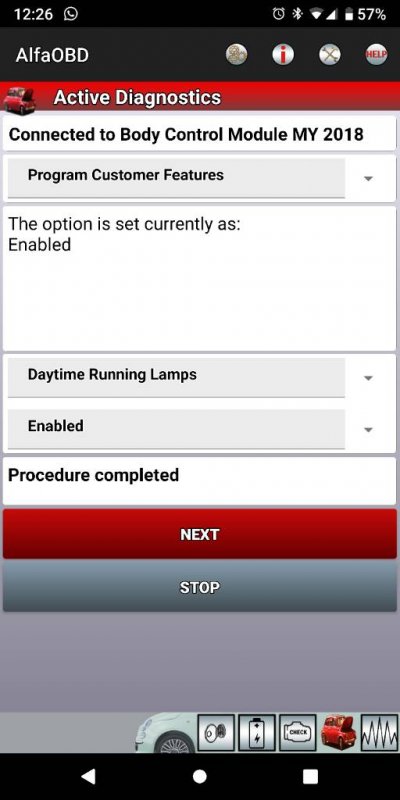
- Selected "DAYTIME RUNNING LAMPS".
- Selected "ENABLED"
- Hit "START" and "NEXT" and got message saying that the change had been made.
If I go back to the "Body Module" and do a "System Status" it shows the following:
- DRL Configuration: Optional DRL
- DRL Lamp Location: Turn Signal DRL
- DRL Dropout Enable: Set
However, I still don't seem to have DRL's enabled. At first I thought that maybe the DRL's aren't on if the vehicle is running but in PARK, so I activated the parking brake, left the truck in DRIVE, and got out and looked, but still no DRL's.
Any thoughts/suggestions would be appreciated. Thanks!
I can't get the setting to display in my lights menu. Think I'm missing a setting somewhere, although my DRLs are indeed functional.Did you go into your settings menue on your radio under (lights) and see if the code is there?
Sent from my SM-G960U using Tapatalk

Were you able to find this setting (Daytime Running Lights CSM) in your car configuration list?I can't get the setting to display in my lights menu. Think I'm missing a setting somewhere, although my DRLs are indeed functional.

Remember you need to actually be connected to the truck for the CSM settings to show up on the tool.You know, I saw a ****load of CSM settings in there, and I'll bet I scrolled right past it while I was hell bent trying to find the other ones.
BRB, going out to check.
This is what I've got, and DRLs are indeed working.Remember you need to actually be connected to the truck for the CSM settings to show up on the tool.
Sent from my SM-G960U using Tapatalk

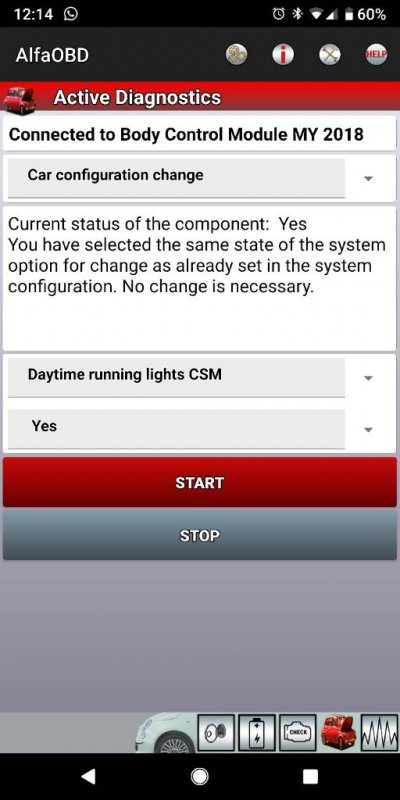
Yes that may be your problem. These are the codes necessary for the DRL's. Make sure you give it some time to show up on your screen.Just found this one as well. Maybe this one was the missing link.
Sent from my Pixel 2 XL using Tapatalk
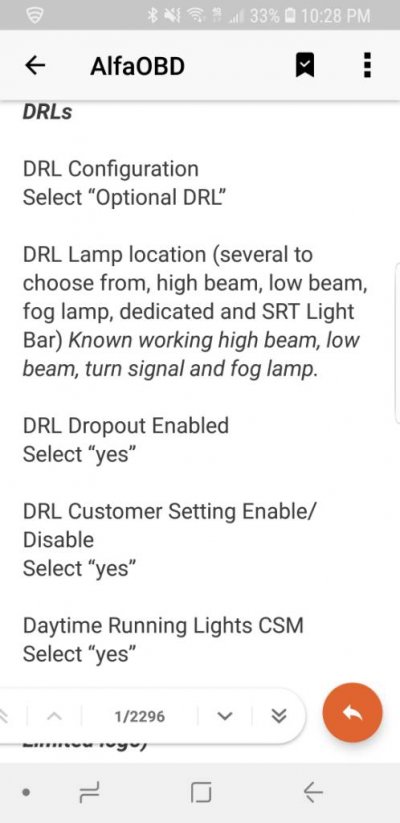
Ahhh, OK. Did not know that.Also I see you have a UAQ radio. It takes quite a bit of time for options to show up on the screen with these radios when they read your BCM so definitely give it a day or so.
Sent from my SM-G960U using Tapatalk
Yes As long as the dealer does not flash your truck for any reason which they should not all of the settings are in your bcm and eventually the new radio will pick them up.Ahhh, OK. Did not know that.
Side note: my radio is going to be replaced in a few weeks for a warranty claim (android auto doesn't work anymore, and two hours in service this morning was enough for them to decide **** it, swap it.) The settings made in the BCM are resident in the BCM alone, correct? So a radio swap will just auto-populate with the info already present, I assume?
Sent from my Pixel 2 XL using Tapatalk